Abaqus Unified FEA 2025 (v6.15.7) – Comprehensive Overview
Introduction
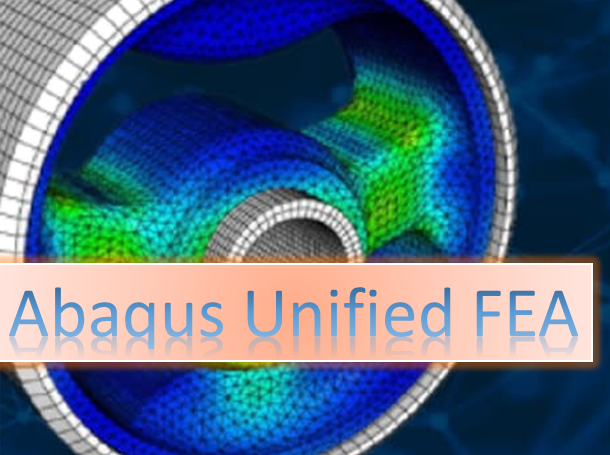
Modern engineering design increasingly relies on advanced simulation tools to analyze complex systems before physical prototypes are built. One of the most powerful platforms used for this purpose is Abaqus Unified Finite Element Analysis (FEA) software. Developed by Dassault Systèmes as part of the SIMULIA simulation portfolio, Abaqus Unified FEA 2025 (v6.15.7) provides engineers and researchers with a complete environment for performing highly accurate structural, thermal, fluid, and multiphysics simulations.
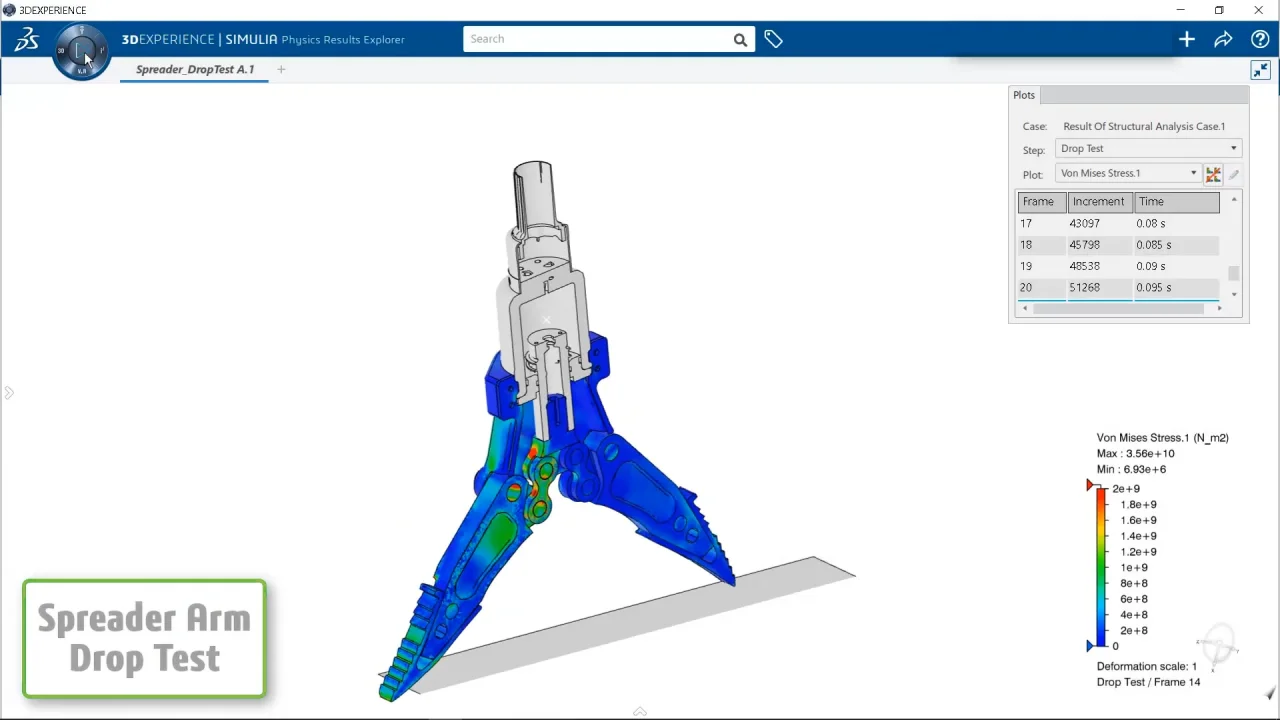
Abaqus has long been recognized as a leading simulation tool used in industries such as aerospace, automotive, civil engineering, biomedical engineering, energy systems, and product design. The Unified FEA platform integrates different analysis procedures, modeling capabilities, and solver technologies into one cohesive environment.
The 2025 release improves performance, scalability, user interface efficiency, and simulation accuracy while supporting modern engineering workflows and high-performance computing systems.
1. Overview of Abaqus Unified FEA
Abaqus Unified FEA is a finite element analysis software suite used to simulate how products behave under real-world conditions. Engineers use it to test designs virtually before manufacturing, reducing cost, time, and risk.
The software allows users to simulate:
-
Structural mechanics
-
Thermal behavior
-
Fluid-structure interactions
-
Electromagnetic effects
-
Multiphysics coupling
-
Nonlinear material behavior
Abaqus provides accurate numerical methods that can solve simple linear problems as well as extremely complex nonlinear simulations involving large deformation, contact, fracture, and dynamic events.
The “Unified” concept means that all simulation components work together within the same environment, ensuring seamless integration between modeling, solving, and visualization.
2. Core Components of Abaqus
The Abaqus platform consists of several main modules that work together to perform simulations.
2.1 Abaqus/CAE
Abaqus/CAE is the graphical modeling interface where users build geometry, define materials, create meshes, set boundary conditions, and visualize results.
Key capabilities include:
-
Geometry modeling
-
Mesh generation
-
Material definition
-
Assembly creation
-
Load and boundary condition setup
-
Job submission
-
Result visualization
Abaqus/CAE provides a user-friendly interface that integrates modeling and simulation in a single environment.
2.2 Abaqus/Standard
Abaqus/Standard is an implicit solver designed for static and quasi-static simulations.
It is used for:
-
Linear and nonlinear structural analysis
-
Thermal analysis
-
Stress and deformation studies
-
Long-duration simulations
This solver is particularly useful when high accuracy is required for stable problems.
2.3 Abaqus/Explicit
Abaqus/Explicit is an explicit dynamic solver designed for high-speed and highly nonlinear events.
Typical applications include:
-
Impact simulations
-
Crash analysis
-
Drop tests
-
Explosion modeling
-
Metal forming
Explicit analysis is preferred when simulations involve short time periods and extreme nonlinear behavior.
2.4 Abaqus Multiphysics
Abaqus supports complex multiphysics simulations, allowing multiple physical phenomena to interact within the same model.
Examples include:
-
Thermal-structural coupling
-
Fluid-structure interaction
-
Electromagnetic-thermal coupling
-
Piezoelectric analysis
This capability allows engineers to simulate realistic physical systems where different forces interact simultaneously.
3. Key Features of Abaqus Unified FEA 2025
The 2025 release introduces many improvements in usability, performance, and simulation capability.
3.1 Advanced Nonlinear Simulation
Abaqus is widely known for its ability to handle highly nonlinear problems.
Examples include:
-
Large deformation
-
Material plasticity
-
Hyperelastic materials
-
Contact mechanics
-
Fracture and failure
These capabilities allow engineers to analyze materials like rubber, metals, composites, and biological tissues.
3.2 High-Performance Computing (HPC)
Modern engineering simulations require enormous computational power.
Abaqus 2025 supports:
-
Multi-core processing
-
GPU acceleration
-
Distributed computing
-
Cloud-based simulation
This enables engineers to simulate large-scale models with millions of elements efficiently.
3.3 Advanced Contact Modeling
Contact interactions between surfaces are common in mechanical systems.
Abaqus provides robust contact algorithms for:
-
Surface-to-surface contact
-
Friction modeling
-
Self-contact
-
Sliding interfaces
This capability is critical for simulations such as:
-
Gear mechanisms
-
Mechanical assemblies
-
Impact events
3.4 Material Modeling
Abaqus contains a vast material library and advanced material models.
Supported materials include:
-
Metals
-
Plastics
-
Rubber
-
Composites
-
Foams
-
Biological materials
Material behaviors supported:
-
Elastic
-
Plastic
-
Viscoelastic
-
Hyperelastic
-
Creep
-
Damage and fracture
Engineers can also define custom material models using user subroutines.
3.5 Python Automation
Abaqus allows automation using the Python scripting language.
Python scripting can automate:
-
Model creation
-
Mesh generation
-
Simulation execution
-
Result extraction
-
Batch simulations
This greatly increases productivity for engineers performing repetitive simulation tasks.
4. Simulation Capabilities
Abaqus Unified FEA provides a wide range of simulation capabilities across different engineering domains.
4.1 Structural Analysis
Structural analysis determines how structures respond to loads.
Examples include:
-
Stress analysis
-
Deformation
-
Buckling
-
Fatigue
Industries use this to ensure safety and reliability.
4.2 Thermal Analysis
Thermal simulations analyze heat transfer and temperature distribution.
Applications include:
-
Heat conduction
-
Thermal expansion
-
Cooling systems
-
Electronic thermal management
4.3 Dynamic Analysis
Dynamic simulations analyze structures subjected to time-dependent loads.
Examples:
-
Vibrations
-
Shock loads
-
Impact
-
Earthquake analysis
4.4 Fluid-Structure Interaction
Some simulations involve interactions between fluids and solid structures.
Examples include:
-
Wind loading on buildings
-
Aircraft aerodynamics
-
Blood flow in arteries
4.5 Fracture and Failure Analysis
Abaqus can simulate how materials crack and fail.
Methods include:
-
Cohesive elements
-
Damage mechanics
-
Crack propagation
-
Fatigue analysis
This is critical for safety-critical industries.
5. Mesh Generation and Geometry Handling
Mesh generation is an important part of finite element analysis.
Abaqus provides tools for:
-
Structured meshes
-
Unstructured meshes
-
Hexahedral elements
-
Tetrahedral elements
Users can control:
-
Mesh density
-
Element type
-
Local refinement
Better meshes result in more accurate simulations.
6. Visualization and Post-Processing
Simulation results are visualized using advanced post-processing tools in Abaqus.
Users can view:
-
Stress contours
-
Deformation animations
-
Temperature distributions
-
Velocity fields
-
Crack propagation
Results can be exported as:
-
Images
-
Animations
-
Reports
-
Data files
Visualization helps engineers understand complex simulation behavior.
7. Integration with Other Engineering Tools
Abaqus integrates with many CAD and engineering platforms.
Examples include:
-
CATIA
-
SOLIDWORKS
-
Autodesk Inventor
This integration allows engineers to import geometry directly from design software.
The software is also integrated with the 3DEXPERIENCE Platform, enabling collaborative simulation workflows across teams.
8. Industrial Applications
Abaqus Unified FEA is used in many industries.
Aerospace Industry
Aerospace engineers use Abaqus to simulate:
-
Aircraft structures
-
Engine components
-
Composite materials
-
Landing gear systems
It helps ensure safety and performance in aircraft design.
Automotive Industry
Automotive engineers use Abaqus for:
-
Crash testing
-
Vehicle durability
-
Suspension analysis
-
Lightweight design
Companies rely on simulation to reduce physical prototypes.
Civil Engineering
In civil engineering Abaqus is used for:
-
Bridge analysis
-
Earthquake simulation
-
Structural stability
-
Concrete cracking
This helps design safer infrastructure.
Biomedical Engineering
Abaqus plays a major role in biomedical research.
Applications include:
-
Bone mechanics
-
Medical implants
-
Prosthetic devices
-
Tissue modeling
Energy Industry
Energy engineers use Abaqus for:
-
Wind turbine simulation
-
Oil and gas pipelines
-
Nuclear reactor components
-
Renewable energy systems
9. Advantages of Abaqus Unified FEA
Abaqus offers many advantages compared with other simulation tools.
High Accuracy
Abaqus is known for extremely accurate solutions to nonlinear problems.
Robust Solvers
The combination of Standard and Explicit solvers provides flexibility for different simulation types.
Multiphysics Capabilities
Multiple physics interactions can be analyzed simultaneously.
Automation
Python scripting allows efficient automation of complex workflows.
Industry Acceptance
Abaqus is widely used by major engineering companies and research institutions worldwide.
10. Improvements in Abaqus 2025
The 2025 version introduces several improvements.
Key enhancements include:
-
Faster solver performance
-
Improved contact algorithms
-
Better GPU utilization
-
Enhanced meshing tools
-
Improved user interface
-
Advanced multiphysics coupling
-
Larger model support
These improvements allow engineers to simulate more complex systems with higher efficiency.
11. Learning and Training Resources
Engineers can learn Abaqus through various resources:
-
Official SIMULIA training programs
-
University courses
-
Engineering workshops
-
Online tutorials
-
Technical documentation
Mastering Abaqus requires understanding:
-
Finite element theory
-
Material mechanics
-
Numerical methods
-
Engineering physics
12. Future of Simulation with Abaqus
Simulation technology continues to evolve rapidly.
Future trends include:
-
AI-assisted simulation
-
Cloud-based engineering platforms
-
Digital twins
-
Real-time simulation
-
Automated design optimization
With integration into the 3DEXPERIENCE ecosystem, Abaqus is expected to remain a major tool in the future of virtual engineering and digital product development.
Conclusion
Abaqus Unified FEA 2025 (v6.15.7) is one of the most powerful finite element simulation platforms available today. Developed by Dassault Systèmes under the SIMULIA brand, it provides a unified environment for performing advanced structural, thermal, and multiphysics simulations.
With capabilities ranging from basic stress analysis to complex nonlinear dynamic simulations, Abaqus enables engineers to predict real-world behavior accurately before manufacturing begins. Its advanced solvers, powerful modeling tools, automation features, and high-performance computing support make it an essential tool for modern engineering.
As industries increasingly rely on virtual testing and digital engineering workflows, Abaqus continues to play a vital role in improving product quality, reducing development costs, and accelerating innovation across aerospace, automotive, civil, biomedical, and energy sectors.
MSC Nastran 2025 (v2025.1) Free
Abaqus Unified FEA 2025 (v6.15.7) free Download