Wondershare Filmora 14.0.1.1135 – Smart, Fast, and Creative Video Editing Software
Introduction
Video content has become one of the most powerful ways to communicate, entertain, and educate audiences across digital platforms. From YouTube creators and social media influencers to educators, marketers, and small businesses, the demand for high-quality video editing tools continues to grow. Among the many video editors available today, Wondershare Filmora stands out for its balance between ease of use and professional features.
Wondershare Filmora 14.0.1.1135 represents a refined and intelligent version of the Filmora series, focusing on performance, creativity, and AI-powered tools. This release builds on Filmora’s reputation as a beginner-friendly yet capable editor, offering advanced effects, smooth workflows, and modern design without overwhelming users.
This article explores Wondershare Filmora 14.0.1.1135 in depth, covering its interface, editing tools, AI features, performance, supported formats, and why it remains one of the most popular video editing solutions for modern creators.
Overview of Wondershare Filmora
Wondershare Filmora is a feature-rich video editing software designed for creators who want professional-looking videos without the complexity of traditional editors. It supports a wide range of video formats and offers powerful editing tools packaged in an intuitive interface.
Key highlights of Filmora include:
-
Easy-to-learn interface
-
Advanced visual effects
-
Built-in transitions and templates
-
AI-powered editing tools
-
Fast rendering and export options
Filmora is available for Windows and macOS, making it accessible to a wide audience.
What’s New in Filmora 14.0.1.1135
1. Enhanced AI Capabilities
Filmora 14 places a strong emphasis on artificial intelligence to simplify editing tasks.
Key AI improvements include:
-
Smarter scene detection
-
Improved AI background removal
-
Enhanced auto caption accuracy
-
Faster AI rendering
These tools help users save time while achieving professional results.
2. Performance and Stability Improvements
Version 14.0.1.1135 focuses on optimization and reliability.
Enhancements include:
-
Faster timeline response
-
Reduced lag during preview playback
-
Improved GPU acceleration
-
Better handling of large 4K projects
This ensures smoother editing, even on mid-range systems.
3. Refined User Experience
Small interface and workflow refinements make Filmora more intuitive.
Improvements include:
-
Cleaner menus and panels
-
Better organization of effects and assets
-
Improved drag-and-drop behavior
These refinements improve productivity and user comfort.
User Interface and Design
1. Modern and Beginner-Friendly Layout
Filmora’s interface is designed to be visually clean and easy to navigate. The workspace is divided into logical sections, including media library, preview window, timeline, and tools panel.
Benefits include:
-
Minimal learning curve
-
Clear icons and labels
-
Easy access to commonly used tools
This makes Filmora suitable for beginners while remaining powerful enough for experienced users.
2. Customizable Workspace
Filmora allows users to customize the workspace according to their editing style.
Users can:
-
Resize panels
-
Adjust timeline zoom
-
Choose different editing modes
Filmora 14.0.1.1135 ensures smoother interface interactions.
3. Dark Mode Design
The dark-themed interface reduces eye strain during long editing sessions and enhances focus on visual content.
Core Video Editing Tools
1. Timeline Editing
Filmora offers a flexible and responsive timeline.
Timeline features include:
-
Multi-track editing
-
Precision trimming and splitting
-
Ripple and roll edits
-
Magnetic timeline support
These tools make editing fast and accurate.
2. Clip Editing and Adjustment
Filmora provides detailed control over clips.
Users can adjust:
-
Speed and duration
-
Rotation and cropping
-
Opacity and blending modes
-
Color and brightness
Filmora 14 improves clip responsiveness and preview accuracy.
3. Keyframe Animation
Keyframe editing allows users to animate properties such as position, scale, rotation, and opacity.
This feature is useful for:
-
Motion graphics
-
Dynamic transitions
-
Text and title animations
AI-Powered Editing Features
1. AI Background Remover
Filmora’s AI background remover allows users to isolate subjects without a green screen.
Benefits include:
-
Fast subject detection
-
Clean edge separation
-
Useful for social media and marketing videos
2. AI Smart Cutout
This tool enables precise object selection and removal.
Users can:
-
Track moving objects
-
Replace backgrounds
-
Create creative compositions
3. AI Auto Captions
Filmora automatically generates subtitles from spoken audio.
Features include:
-
High accuracy
-
Editable captions
-
Multiple language support
This is especially useful for accessibility and social media platforms.
Effects, Transitions, and Titles
1. Built-In Visual Effects
Filmora includes a wide library of effects.
Categories include:
-
Filters and LUTs
-
Overlays and light leaks
-
Motion effects
-
Cinematic styles
These effects help enhance videos with minimal effort.
2. Transitions
Filmora offers smooth and creative transitions.
Transition features include:
-
Drag-and-drop application
-
Adjustable duration
-
Categories for different styles
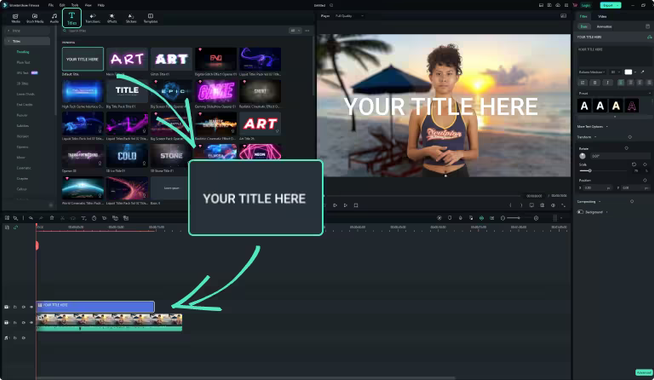
3. Titles and Text Tools
Filmora’s text tools are versatile and easy to use.
Users can:
-
Create animated titles
-
Customize fonts and colors
-
Add lower thirds and subtitles
Filmora 14 improves title rendering and animation smoothness.
Audio Editing Capabilities
1. Built-In Audio Tools
Filmora includes essential audio editing tools.
Features include:
-
Volume and fade control
-
Audio equalizer
-
Noise reduction
-
Audio ducking
2. Music and Sound Effects Library
Filmora provides access to a built-in audio library.
Users can:
-
Add background music
-
Insert sound effects
-
Adjust timing easily
3. Voice Recording
Filmora supports direct voice recording, making it suitable for tutorials, presentations, and narration.
Color Correction and Grading
1. Basic Color Controls
Filmora allows quick color adjustments.
Users can modify:
-
Exposure
-
Contrast
-
Saturation
-
White balance
2. Advanced Color Tools
Advanced color features include:
-
Color wheels
-
LUT support
-
Fine-tuned shadow and highlight control
Filmora 14.0.1.1135 improves color preview accuracy.
Supported Formats and Resolutions
Filmora supports a wide range of media formats.
Supported Formats
-
MP4
-
MOV
-
AVI
-
MKV
-
WMV
-
MP3
-
WAV
Supported Resolutions
-
HD
-
Full HD
-
2K
-
4K
This ensures compatibility with modern cameras and devices.
Export and Rendering Options
1. Flexible Export Settings
Filmora allows users to export videos with custom settings.
Options include:
-
Resolution selection
-
Bitrate control
-
Frame rate adjustment
2. Platform-Optimized Presets
Filmora offers presets for:
-
YouTube
-
Instagram
-
TikTok
-
Facebook
These presets simplify sharing content online.
3. Fast Rendering Performance
Filmora 14.0.1.1135 improves rendering speed through optimized GPU acceleration.
System Requirements
Filmora is designed to run on a wide range of systems.
-
Operating System: Windows / macOS
-
Processor: Multi-core CPU recommended
-
RAM: 8 GB recommended
-
Storage: SSD recommended for best performance
Why Choose Wondershare Filmora 14.0.1.1135
Filmora stands out because it offers:
-
Powerful features with an easy interface
-
AI tools that save time
-
Smooth performance for modern video formats
-
A balance between creativity and simplicity
It is ideal for:
-
YouTubers
-
Content creators
-
Educators
-
Small businesses
-
Social media marketers
Tips for Best Editing Results
-
Use proxy files for smoother playback
-
Apply color correction before effects
-
Keep projects organized with folders
-
Use AI tools to speed up workflows
-
Export in platform-optimized formats
Conclusion
Wondershare Filmora 14.0.1.1135 is a smart, efficient, and creative video editing solution designed for modern content creators. By combining an intuitive interface with advanced features and AI-powered tools, Filmora makes professional video editing accessible to everyone.
With improved performance, enhanced AI tools, rich effects, and flexible export options, Filmora 14.0.1.1135 continues to be an excellent choice for users who want high-quality results without the complexity of traditional professional editors. Whether you are creating videos for social media, education, or marketing, Filmora delivers a smooth and enjoyable editing experience.



