Shotcut 24.10.0 – Free and Open-Source Video Editing Software for Everyone
Introduction
In the world of video creation, having access to a reliable, versatile, and cost-effective video editor is essential. Shotcut 24.10.0 stands out as one of the most popular free and open-source video editing software solutions available today. Whether you are a beginner exploring video editing for the first time, a student creating educational content, or a small business owner producing marketing videos, Shotcut offers the tools you need without any subscription fees.
Shotcut 24.10.0 builds on the software’s long-standing reputation by improving performance, adding new effects, refining audio editing capabilities, and making the user interface more intuitive. With multi-format support, flexible timeline editing, and a comprehensive library of filters and effects, Shotcut continues to serve a global audience of creators.
This article provides an in-depth exploration of Shotcut 24.10.0, covering its interface, core video editing features, audio tools, visual effects, supported formats, export options, system requirements, and practical tips for efficient video production.
Overview of Shotcut
Shotcut is a cross-platform, free, and open-source video editor available for Windows, macOS, and Linux. Unlike many free editors that limit features or include watermarks, Shotcut offers full functionality without restrictions.
Key advantages of Shotcut include:
-
Open-source and completely free
-
Wide format support for video, audio, and images
-
Non-linear editing with multi-track timeline
-
Comprehensive audio and video effects
-
Regular updates with new features and improvements
Shotcut is an ideal solution for creators seeking a professional-quality video editor without the cost of commercial software.
What’s New in Shotcut 24.10.0
Shotcut 24.10.0 introduces several new improvements and feature updates, including:
-
Enhanced Performance – Optimized playback and timeline responsiveness, especially for high-resolution videos.
-
Updated Audio Filters – Improved audio processing and noise reduction capabilities.
-
New Video Filters – Additional color correction tools, transitions, and motion effects.
-
Refined User Interface – Cleaner menus, better workspace organization, and improved preview performance.
-
Bug Fixes and Stability Enhancements – Reduced crashes and improved reliability for large projects.
These updates make Shotcut 24.10.0 more efficient and enjoyable for both beginners and advanced users.
User Interface and Workflow
1. Modern and Flexible Layout
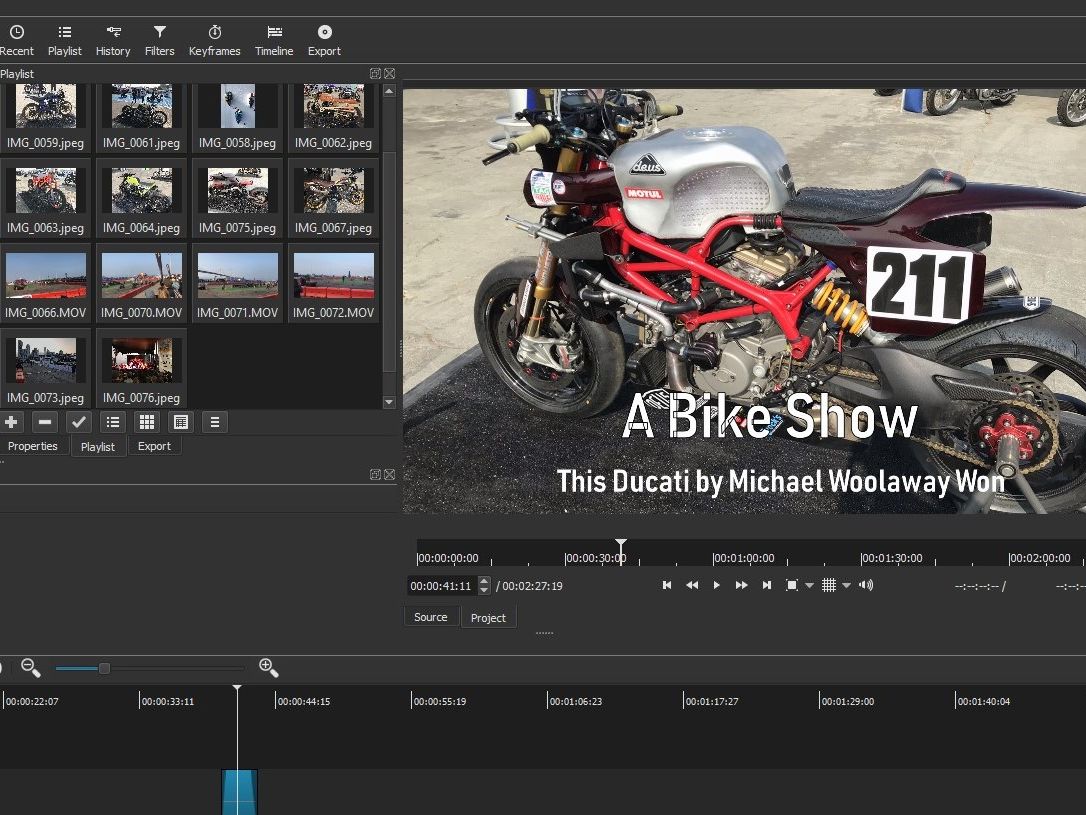
Shotcut offers a clean and minimalistic interface with logical panels:
-
Playlist Panel: Manage all imported media files.
-
Timeline Panel: Multi-track timeline for editing video, audio, and effects.
-
Preview Window: Real-time preview of edits, effects, and transitions.
-
Filters Panel: Apply and adjust video and audio filters easily.
The layout is fully dockable and resizable, allowing users to customize the workspace to their preferred workflow.
2. Workspace Customization
Shotcut allows users to create custom workspaces for specific tasks:
-
Editing-focused workspace
-
Audio mixing workspace
-
Color grading workspace
-
Effects and compositing workspace
This flexibility ensures that creators can optimize their environment for the type of content they are producing.
3. Dark Mode Interface
Shotcut supports a dark-themed interface, which reduces eye strain during long editing sessions and highlights video content more effectively.
Core Video Editing Features
1. Multi-Track Timeline Editing
Shotcut provides a flexible multi-track timeline:
-
Unlimited video and audio tracks
-
Ripple, roll, and slip edits
-
Keyframe animation for filters and effects
-
Nested timelines for complex projects
This allows precise control over video composition and sequencing.
2. Clip Adjustment and Transform Tools
Users can manipulate individual clips using Shotcut’s powerful tools:
-
Crop, rotate, and resize
-
Adjust speed and duration
-
Control opacity and blending modes
-
Apply motion effects like pan and zoom
Shotcut 24.10.0 improves responsiveness when applying transformations.
3. Keyframe Animation
Shotcut supports keyframes for animating properties such as:
-
Motion and position
-
Opacity changes
-
Filter parameters
-
Audio volume and panning
Keyframe functionality allows for smooth and professional-looking edits.
Video Filters and Effects
1. Built-In Effects Library
Shotcut 24.10.0 includes a wide array of effects:
-
Color grading tools (hue, saturation, brightness, contrast)
-
Motion effects and transitions
-
Blurs, glows, and stylized effects
-
Text and title overlays
These effects allow users to enhance the visual appeal of their projects.
2. Transitions
Smooth transitions between clips help maintain flow and professionalism:
-
Crossfades and wipes
-
Slide and push transitions
-
Customizable durations and timing
3. Compositing and Masking
Shotcut supports advanced compositing techniques:
-
Alpha channel support
-
Picture-in-picture and overlays
-
Masking for selective effect application
These tools give creators more creative freedom.
Audio Editing Features
1. Built-In Audio Tools
Shotcut includes essential audio editing capabilities:
-
Volume control and fading
-
Equalizer adjustments
-
Noise reduction and normalization
-
Audio keyframing
2. Music and Sound Effects Integration
Users can import music tracks or sound effects to enhance video storytelling:
-
Sync audio with visual cues
-
Layer multiple audio tracks
-
Adjust timing and effects independently
3. Voice Recording
Shotcut supports direct voice recording, making it suitable for tutorials, presentations, and voice-over work.
Color Correction and Grading
1. Basic Adjustments
Users can quickly correct colors:
-
Exposure, contrast, and brightness
-
Saturation and hue adjustment
-
White balance correction
2. Advanced Grading
For more cinematic looks, Shotcut offers:
-
RGB color wheels
-
LUT (Lookup Table) support
-
HSL adjustments for selective color correction
Shotcut 24.10.0 enhances color grading workflow and preview accuracy.
Supported Formats and Resolutions
Shotcut supports nearly all modern media formats:
| Media Type | Supported Formats |
|---|---|
| Video | MP4, MOV, AVI, MKV, WMV, FLV, WebM |
| Audio | MP3, WAV, AAC, FLAC, OGG |
| Image | PNG, JPG, BMP, TIFF |
| 3D/Animation | OpenEXR, Animated GIF |
Supported resolutions include SD, HD, Full HD, 2K, and 4K, making it suitable for both online content and professional productions.
Export and Rendering Options
1. Flexible Export Settings
Shotcut offers customizable export settings:
-
Resolution and frame rate selection
-
Bitrate and codec control
-
Format selection (MP4, MOV, WebM, etc.)
2. Platform Presets
Preset export options simplify publishing for:
-
YouTube
-
Vimeo
-
Instagram
-
TikTok
3. Fast Rendering
Shotcut 24.10.0 benefits from optimized hardware acceleration, reducing rendering time and improving workflow efficiency.
System Requirements
| Requirement | Minimum | Recommended |
|---|---|---|
| OS | Windows 10 / macOS 11 / Linux | Windows 11 / macOS 12 / Linux latest |
| Processor | Intel Core i3 / AMD Ryzen 3 | Intel Core i7 / AMD Ryzen 7 |
| RAM | 4 GB | 8 GB or higher |
| GPU | Integrated graphics | NVIDIA GTX 1050 / AMD Radeon RX 560 |
| Storage | 2 GB free | 10 GB SSD recommended |
Shotcut 24.10.0 Features Table
| Feature | Description |
|---|---|
| Multi-Track Timeline | Unlimited video/audio tracks with precise editing tools |
| Clip Adjustment | Crop, rotate, resize, speed adjustment, opacity control |
| Keyframe Animation | Animate video and audio parameters for smooth transitions |
| Video Filters | Color grading, blur, glow, stylized effects |
| Transitions | Crossfade, slide, push, and customizable transitions |
| Compositing & Masking | Alpha channel support, picture-in-picture, selective effects |
| Audio Editing | Volume, fade, equalizer, noise reduction, keyframing |
| Voice Recording | Record narration directly into the timeline |
| Color Correction & Grading | Basic adjustments, RGB wheels, LUTs, HSL selective coloring |
| Supported Formats | Video, audio, image, animation, nearly all modern formats |
| Export & Presets | Custom settings and platform-specific presets |
| Hardware Acceleration | Optimized GPU usage for smooth playback and faster rendering |
Who Should Use Shotcut 24.10.0
Shotcut is ideal for:
-
Beginners entering video editing
-
Students creating educational content
-
YouTubers and vloggers
-
Small businesses producing marketing videos
-
Hobbyists and semi-professional creators
Its open-source nature ensures there is no cost barrier while still offering professional-grade capabilities.
Tips for Efficient Editing
-
Organize media files before starting projects
-
Use proxy files for high-resolution footage to improve playback
-
Apply basic color corrections before adding effects
-
Layer audio tracks carefully to avoid clutter
-
Save and back up projects regularly
Conclusion
Shotcut 24.10.0 is a free, versatile, and professional-quality video editor suitable for creators at all skill levels. With multi-track editing, advanced audio and video effects, compositing capabilities, and full support for modern formats and resolutions, Shotcut delivers the tools needed to produce high-quality videos. Its open-source nature, combined with continuous updates and community support, makes it one of the best free video editing solutions available in 2025.
Shotcut



