PeaZip 9.8.0 – The Complete Review of the Free, Open-Source Archiving Tool
PeaZip 9.8.0 continues the legacy of one of the most powerful and versatile open-source file archiving and compression tools available today. Designed for both casual users and IT professionals, this version enhances speed, security, usability, and overall workflow efficiency. Whether you are compressing files for storage, extracting archives from multiple formats, protecting sensitive data with encryption, or managing large data sets, PeaZip 9.8.0 provides a complete, modern, and reliable solution.https://scorpioagersoftware.com/
In this detailed 2000-word review, we explore everything that PeaZip 9.8.0 offers—its features, performance, security options, interface improvements, supported formats, and how it compares to other leading tools like WinRAR and 7-Zip.
1. Introduction to PeaZip 9.8.0
PeaZip has always stood out as an open-source alternative to commercial compression tools. Built on the strong foundations of the 7z and p7zip technologies, PeaZip delivers a rich set of features that go far beyond simple file extraction and compression.
The 9.8.0 update focuses on improved performance, usability tweaks, extended file format support, and enhanced encryption workflows. The tool is available for Windows, Linux, and BSD systems, making it one of the most accessible compression utilities across platforms.
What makes PeaZip truly special is its combination of speed, security, and flexibility—all while remaining free and open source, with absolutely no ads, no tracking, and no restrictions.
2. What’s New in PeaZip 9.8.0
PeaZip 9.8.0 introduces several enhancements designed to make extraction, compression, and file management faster and more intuitive. The update focuses heavily on performance improvements and refinements to the user experience.https://scorpioagersoftware.com/
Key improvements include:
✔ Faster multi-core compression and extraction
PeaZip now uses optimized threading to accelerate operations on modern CPUs. Large archives, such as game backups or multimedia packages, now extract considerably faster.
✔ Updated backend engines
The 7z and other libraries are updated, improving speed, compatibility, and stability across all supported formats.
✔ Improved file preview and browsing
The internal file manager feels more responsive, especially when working with large folder structures.
✔ Enhanced security presets
The update strengthens default encryption settings, ensuring better data protection for sensitive files.
✔ UI refinements
Navigation, icons, menus, and tooltips have been cleaned up for a smoother experience.
✔ Extended archive format compatibility
Better support for new and emerging compression standards.
Together, these updates make PeaZip 9.8.0 one of the most polished and efficient versions released.
3. Supported File Formats
One of PeaZip’s greatest strengths is its massive format support. It can open and extract over 200 file types, making it more versatile than many commercial tools.
Formats PeaZip can extract:
-
ZIP, ZIPX
-
7Z, XZ
-
RAR, RAR5
-
TAR, GZ, TGZ
-
ISO, UDF
-
ACE, ARJ, CAB
-
LZH, Z
-
WIM
-
BZ2, DMG
Formats PeaZip can create:
-
7Z
-
ZIP
-
TAR
-
WIM
-
GZ
-
BZ2
-
XZ
The ability to handle such a wide range of formats means users rarely encounter incompatible archives. Whether dealing with legacy compression tools or modern high-efficiency formats, PeaZip can manage it all.
4. Performance and Speed Improvements
PeaZip 9.8.0 brings noticeable performance upgrades, especially when handling large archives. The multi-threading engine has been optimized, allowing modern multi-core processors to deliver maximum speed during both compression and extraction.
Performance highlights:
✔ Faster compression
7z compression—one of the strongest algorithms—now benefits from improved threading and memory optimization.
✔ Faster extraction
Archives containing thousands of files open and extract more quickly.
✔ Optimized RAM usage
Memory consumption has been reduced for large operations, improving stability on mid-range systems.
✔ Better handling of complex formats
RAR and ZIPX archives extract more efficiently than before.
For users dealing with massive data—like developers, engineers, video editors, and IT admins—these improvements make a significant difference.https://scorpioagersoftware.com/
5. Security and Encryption Features
Security has always been a major strength of PeaZip, and version 9.8.0 continues to reinforce this area.
✔ AES-256 Encryption
The industry standard for high-security compression is fully supported.
✔ Encrypted password manager
PeaZip offers a secure password vault to store access credentials for encrypted archives.
✔ Two-Factor Authentication (Optional)
Users can secure encryption workflows with additional authentication layers.
✔ Secure file deletion
The integrated Secure Delete feature permanently erases files by overwriting data to prevent recovery.
✔ Checksum and hashing tools
MD5, SHA-256, SHA-512, and other hashing methods help verify file integrity.
✔ Encrypted archives with key files
You can strengthen archive security by combining a password with a physical key file—ideal for sensitive or confidential data.
Together, these features make PeaZip 9.8.0 a complete security toolkit, not just a compression tool.
6. User Interface and Usability
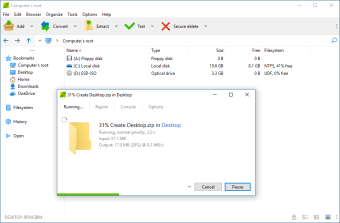
The updated interface in PeaZip 9.8.0 is clean, structured, and easy to navigate. Even beginners can quickly understand how to compress or extract files.
UI improvements include:
-
More responsive file manager
-
Cleaner drag-and-drop interactions
-
Simplified context menus
-
Faster right-click integration in Windows Explorer
-
Better icons and layout spacing
-
Improved search and navigation tools
Despite its powerful capabilities, PeaZip remains visually simple and beginner-friendly.https://scorpioagersoftware.com/
7. Archiving Features and Advanced Tools
PeaZip is not just a compressor—it includes an extensive toolkit for power users.
7.1 File splitting and joining
Large files can be split into segments for easier transfer or storage.
7.2 Batch operations
Compress or extract hundreds of files at once with batch scripts.
7.3 Advanced compression settings
Control dictionary size, compression level, CPU threads, and more.
7.4 Archive conversion
Convert archives between formats without fully extracting them.
7.5 Bookmark and history tools
Quickly revisit frequently used folders.
7.6 Portable version available
PeaZip can run without installation, ideal for USB drives.
These advanced options place PeaZip in the same league as professional archiving utilities.

8. PeaZip vs. Other Compression Tools
PeaZip vs. WinRAR
-
PeaZip is free and open-source; WinRAR is paid.
-
PeaZip supports more formats.
-
WinRAR has slightly faster RAR compression, but PeaZip extracts RAR very efficiently.
vs. 7-Zip
-
7-Zip has slightly better compression in 7z format.
-
PeaZip offers a far better interface and more usability features.
-
PeaZip supports many more archive formats.
vs. WinZip
-
WinZip is commercial with additional cloud features.
-
PeaZip is free with advanced security and format support.
-
PeaZip is lighter and faster for local tasks.
In most cases, PeaZip proves to be the better choice, especially for users who want a free, flexible, and feature-rich solution.
9. Who Should Use PeaZip 9.8.0?
PeaZip is ideal for:
-
Students compressing projects
-
Office workers managing document archives
-
Gamers handling mod or game backup archives
-
Content creators working with large media files
-
Developers and IT professionals managing data across multiple formats
-
Cybersecurity users who need encryption and secure file deletion
Its flexibility makes it useful for nearly everyone.
10. Final Verdict: Why PeaZip 9.8.0 Is Worth Using
PeaZip 9.8.0 is one of the most powerful free archiving tools available. It delivers:
✔ Strong compression
✔ High-security encryption
✔ Support for over 200 formats
✔ Fast performance
✔ A clean, user-friendly interface
✔ Open-source transparency
✔ No ads
✔ No bloatware
For anyone needing a reliable, modern, and feature-packed file manager and compression tool, PeaZip 9.8.0 is a top choice.



