Onshape 2025 Cloud Edition – The Future of Browser-Based CAD
Onshape 2025 Cloud Edition continues to redefine how engineers and product designers create, collaborate, and manage CAD data in a fully cloud-native environment. Unlike traditional desktop CAD systems that require powerful local hardware, manual file management, and version control systems, Onshape runs entirely in the web browser. This modern approach eliminates installation headaches, simplifies collaboration, and ensures that teams always work on the latest version of their designs.
Since its launch, Onshape has positioned itself as a next-generation CAD solution built specifically for the cloud. The 2025 edition strengthens that vision with performance improvements, smarter data management, enhanced modeling tools, and deeper integration across product development workflows.

Fully Cloud-Native Architecture
One of the most important aspects of Onshape is that it is not simply a desktop CAD program moved online—it was designed from the ground up as a cloud platform. Users can access their projects from Windows, macOS, Linux, or even mobile devices using only a browser and internet connection.
Because all computing happens in secure cloud servers, users no longer need high-end workstations. Complex assemblies and detailed models render smoothly without local performance bottlenecks. Updates are automatic and instant—there are no patches to download, no license servers to manage, and no downtime for upgrades. Every user is always on the newest version.
Real-Time Collaboration Without File Conflicts
Traditional CAD systems rely heavily on file-based workflows. Designers must check files in and out, manage copies, and avoid overwriting each other’s work. Onshape eliminates this issue entirely.
In Onshape 2025, multiple team members can work on the same document simultaneously. Changes appear in real time, similar to collaborative cloud document platforms. Built-in version control tracks every modification, allowing users to branch designs, compare versions, and restore previous states if necessary.
This approach dramatically reduces errors caused by outdated files and improves efficiency in distributed teams. For companies with global operations or remote workers, this capability is transformative.
Advanced Parametric Modeling Tools
Onshape 2025 continues to refine its parametric modeling capabilities. Engineers can create precise sketches, apply constraints, and build complex 3D geometry using features such as extrudes, revolves, sweeps, lofts, and advanced surfacing tools.
Parametric design ensures that dimensions and relationships remain editable throughout the project lifecycle. When a parameter changes, the model updates automatically—preserving design intent and reducing rework.
The platform also includes robust assembly tools, allowing designers to create mechanical systems with mates, motion relationships, and interference detection. Large assembly performance has improved in recent updates, making it easier to handle complex industrial equipment and machinery designs.
Integrated Product Data Management (PDM)
One of Onshape’s standout advantages is its built-in Product Data Management (PDM). Unlike many traditional CAD systems that require separate PDM software, Onshape includes version control, release management, and access permissions natively.
Users can:
-
Track design history automatically
-
Create branches for experimentation
-
Approve and release designs
-
Control user access levels
-
Maintain a single source of truth
This integrated approach simplifies workflows and reduces the need for external data management tools.
Simulation and Manufacturing Readiness
Onshape supports integrated simulation tools that allow engineers to test parts and assemblies virtually before manufacturing. Structural analysis and motion studies help identify potential weaknesses or interference early in the design process.
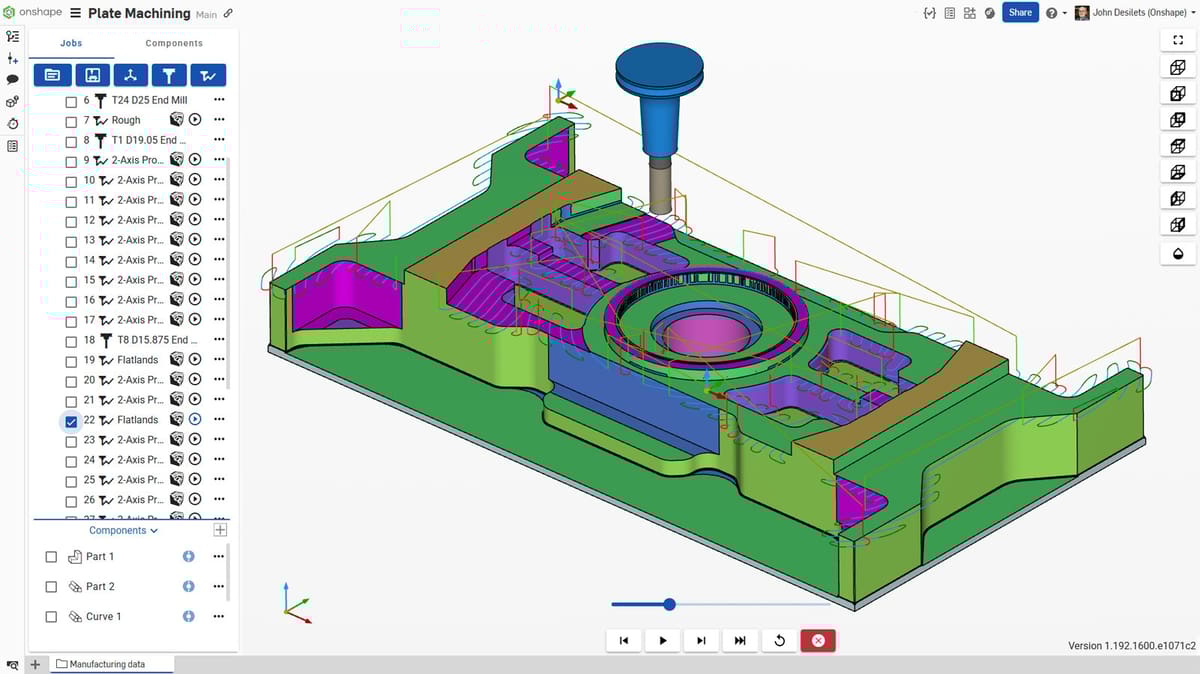
For manufacturing workflows, Onshape supports standard export formats such as STEP, IGES, STL, and DXF, ensuring compatibility with CNC machining, 3D printing, and other fabrication processes. Cloud-based CAM integrations further streamline the transition from design to production.
Mobile Accessibility
A unique benefit of Onshape is its powerful mobile app experience. Engineers can view, edit, and even create models directly from tablets or smartphones. This capability is particularly useful on factory floors, in field environments, or during client meetings where quick access to design data is essential.
The mobile version retains core modeling functionality, which is rare among CAD platforms.
Security and Reliability
Because Onshape is cloud-hosted, security and data protection are central priorities. Enterprise-grade encryption, secure data centers, and controlled user permissions ensure sensitive design information remains protected.
Automatic backups and centralized storage eliminate the risk of lost files due to hardware failure or accidental deletion. For companies concerned about data integrity, this centralized system provides peace of mind.
Who Should Use Onshape 2025?
Onshape 2025 Cloud Edition is particularly well-suited for:
-
Startups and small businesses seeking scalable CAD solutions
-
Distributed engineering teams
-
Educational institutions
-
Product design firms
-
Manufacturing companies embracing digital transformation
Its subscription-based pricing model makes it accessible while removing the need for heavy upfront investment in hardware and IT infrastructure.
Conclusion
Onshape 2025 Cloud Edition represents the evolution of CAD into a fully connected, collaborative, and browser-based experience. By eliminating file-based workflows, integrating PDM, enabling real-time collaboration, and offering powerful parametric modeling tools, it modernizes product development for today’s fast-paced engineering environment.
As industries continue moving toward cloud ecosystems and remote collaboration, Onshape stands out as a forward-thinking solution that aligns perfectly with the future of design and manufacturing
Onshape 2025 – Cloud-Based CAD Software Fee Download



