Media Player Classic – HC 2.1.2.86 – Lightweight, Open-Source Media Player for Pure Playback
Introduction
In a digital age dominated by feature-heavy applications, many users still prefer simplicity, speed, and reliability. When it comes to playing videos and audio files without unnecessary extras, Media Player Classic – Home Cinema (MPC-HC) remains a trusted name. Known for its lightweight design, open-source foundation, and classic interface, MPC-HC continues to attract users who value clean playback and full control.
Media Player Classic – HC 2.1.2.86 represents the modern evolution of this legendary player. While maintaining its familiar look, the latest version brings improved compatibility, better decoding, enhanced subtitle handling, and smoother playback on modern Windows systems.
This article explores MPC-HC 2.1.2.86 in detail, covering its features, improvements, system requirements, advantages, limitations, and why it remains one of the best lightweight media players in 2025.
What is Media Player Classic – HC?
Media Player Classic – Home Cinema (MPC-HC) is a free, open-source multimedia player for Windows. Inspired by the classic Windows Media Player design, MPC-HC focuses on:
-
Minimal resource usage
-
Wide format support
-
High-quality video playback
-
Full user control
Unlike many modern players, MPC-HC avoids ads, bloatware, and unnecessary online features. It is ideal for users who want a pure offline media experience.
Version 2.1.2.86 continues this philosophy while updating the internal components for better performance and compatibility.
Key Features of MPC-HC 2.1.2.86
1. Lightweight and Ultra-Fast Performance
One of MPC-HC’s biggest strengths is its lightweight footprint. The player launches almost instantly and uses very little CPU and RAM, even on older systems.
This makes MPC-HC perfect for:
-
Low-end PCs
-
Older laptops
-
Minimalist setups
-
Users who value speed over visual effects
2. Wide Audio and Video Format Support
MPC-HC includes built-in codecs, allowing it to play most formats without external downloads.
Supported Video Formats:
-
MP4, AVI, MKV, MOV, FLV, WMV
-
MPEG, TS, M2TS
-
WebM and OGM
Supported Audio Formats:
-
MP3, AAC, WAV, FLAC
-
OGG, WMA, M4A
-
DTS and AC3
This broad support ensures smooth playback for nearly all media files.
3. High-Quality Video Playback (HD & 4K)
Despite its small size, MPC-HC delivers excellent video quality. It supports:
-
Full HD (1080p) playback
-
4K UHD video playback
-
High-bitrate video files
-
Advanced video renderers
When configured properly, MPC-HC rivals heavier players in visual clarity.
4. Hardware Acceleration Support
MPC-HC 2.1.2.86 supports modern hardware acceleration technologies such as:
-
DXVA (DirectX Video Acceleration)
-
D3D11 decoding
These technologies reduce CPU load and improve playback smoothness, especially for HD and 4K videos.
5. Advanced Subtitle Support
Subtitle handling is a strong point of MPC-HC. Users can:
-
Load external subtitles automatically
-
Adjust subtitle timing
-
Customize font, color, size, and position
-
Support for SRT, ASS, SSA, SUB, IDX formats
This makes MPC-HC ideal for international content.
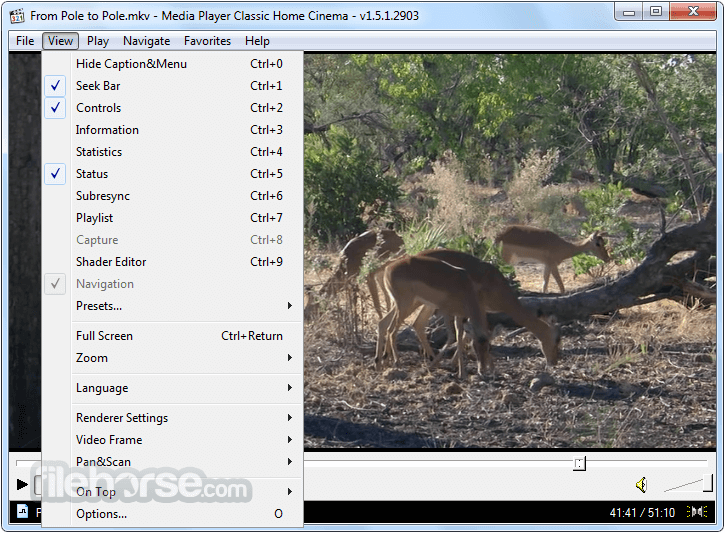
6. Classic and Clean User Interface
The interface of MPC-HC is intentionally simple. It resembles classic Windows Media Player, offering:
-
Clean layout
-
No distractions
-
Easy access to controls
-
Keyboard shortcut support
Users who dislike modern, cluttered interfaces often prefer MPC-HC.
7. Open-Source and Ad-Free
MPC-HC is completely free and open-source, meaning:
-
No ads
-
No tracking
-
No bundled software
-
Full transparency
This makes it a favorite among privacy-conscious users.
8. Advanced Playback Controls
MPC-HC offers precise playback control, including:
-
Frame-by-frame playback
-
Playback speed control
-
Audio track switching
-
Chapter navigation
-
Screenshot capture
These tools are especially useful for video editors and reviewers.
9. Customization and Configuration Options
While the interface is simple, MPC-HC offers deep customization through its settings:
-
Video renderer selection
-
Audio output configuration
-
Filter management
-
Keyboard and mouse shortcuts
Advanced users can fine-tune the player to their exact needs.
What’s New in MPC-HC 2.1.2.86?
This version includes several improvements:
-
Updated internal codecs
-
Better compatibility with Windows 10 and Windows 11
-
Improved hardware acceleration stability
-
Bug fixes and performance optimizations
-
Enhanced subtitle rendering accuracy
These updates keep MPC-HC relevant in modern systems.
System Requirements
Minimum Requirements
-
Operating System: Windows 7 / 8 / 10 / 11
-
Processor: Intel or AMD (Dual-Core)
-
RAM: 1 GB
-
Storage: 100 MB free space
-
Graphics: DirectX-compatible GPU
Recommended Requirements
-
Processor: Intel Core i3 or higher
-
RAM: 2 GB or more
-
Graphics: Dedicated GPU for 4K playback
-
Display: Full HD or 4K monitor
Advantages of MPC-HC 2.1.2.86
-
Extremely lightweight and fast
-
Completely free and open-source
-
No ads or bloatware
-
Excellent subtitle support
-
High-quality HD and 4K playback
-
Ideal for older systems
Disadvantages of MPC-HC 2.1.2.86
-
Interface looks outdated to some users
-
Fewer built-in online features
-
Requires manual configuration for best results
-
No official mobile version
Despite these limitations, many users see them as advantages rather than drawbacks.
MPC-HC vs Modern Media Players
Compared to players like VLC, PotPlayer, or KMPlayer:
-
MPC-HC focuses on simplicity and performance
-
VLC offers more streaming and online features
-
PotPlayer provides deeper customization but is more complex
-
KMPlayer includes ads in the free version
MPC-HC is best for users who want a clean, distraction-free experience.
Who Should Use MPC-HC?
MPC-HC is ideal for:
-
Users with low-spec PCs
-
Fans of classic Windows design
-
Privacy-focused users
-
Professionals needing frame-accurate playback
-
Anyone wanting a fast, no-nonsense media player
Conclusion
Media Player Classic – HC 2.1.2.86 proves that a media player does not need flashy designs or heavy features to deliver excellent performance. With its lightweight architecture, open-source reliability, wide format support, and high-quality playback, it remains one of the best choices for Windows users who value simplicity and efficiency



