Krita 5.3.2 – Complete Review of the Free Professional Digital Painting Software
Krita 5.3.2 stands as one of the most powerful free digital painting tools available today. Loved by illustrators, concept artists, comic creators, matte painters, and hobbyists, Krita has earned its reputation as a high-performance open-source software that rivals paid industry-standard art tools. With the release of version 5.3.2, Krita brings enhanced stability, improved brush engines, upgraded animation tools, and smarter performance optimization that elevates the creative workflow for artists across skill levels.https://scorpioagersoftware.com/
This article explores Krita 5.3.2 in depth—covering its features, performance, tools, UI improvements, brush customization, animation capabilities, color workflow, tablet support, and everything that makes it a top choice for digital artists. Whether you’re a beginner searching for a free but professional tool or a seasoned artist wanting full control without subscriptions, Krita 5.3.2 delivers excellence.https://scorpioagersoftware.com/
1. What Is Krita?
Krita is a free and open-source digital painting and illustration software designed specifically for artists. Unlike general graphic editors, Krita focuses heavily on painting, drawing, texturing, and animation. Its feature set is optimized for:
-
Digital painting
-
Concept art
-
Character art
-
Comic and manga creation
-
2D animation
-
Texture and matte painting
Krita supports virtually all major drawing tablets, offers a non-destructive art workflow, and includes professional tools such as HDR painting, brush stabilization, advanced color modes, vector tools, and a customizable workspace.
Krita’s open-source nature means that artists worldwide can contribute, improve stability, add features, and enhance performance with every update.https://scorpioagersoftware.com/
2. What’s New in Krita 5.3.2
Krita 5.3.2 focuses on polishing the 5.x series with a variety of improvements, bug fixes, and workflow enhancements. Though it is not a major feature release, it brings crucial updates that make the software more stable and reliable.
Key improvements in 5.3.2 include:
2.1 Improved Brush Engine Performance
Brushes feel smoother, more responsive, and more consistent. This is especially noticeable on:
-
High-resolution canvases
-
Fast strokes
-
Stabilizer-enabled brushes
-
Brushes with heavy textures
Artists working on large digital paintings benefit from better stroke tracking and reduced lag.
2.2 Animation System Enhancements
Krita’s animation tools received improved onion-skinning behavior, better playback performance, and cleaner handling of complex timelines.
Animators can expect:
-
Faster frame switching
-
More stable playback
-
Better sound synchronization
-
Smoother drawing on animation layers
These improvements make Krita a reliable free alternative for 2D animation.
2.3 User Interface Refinements
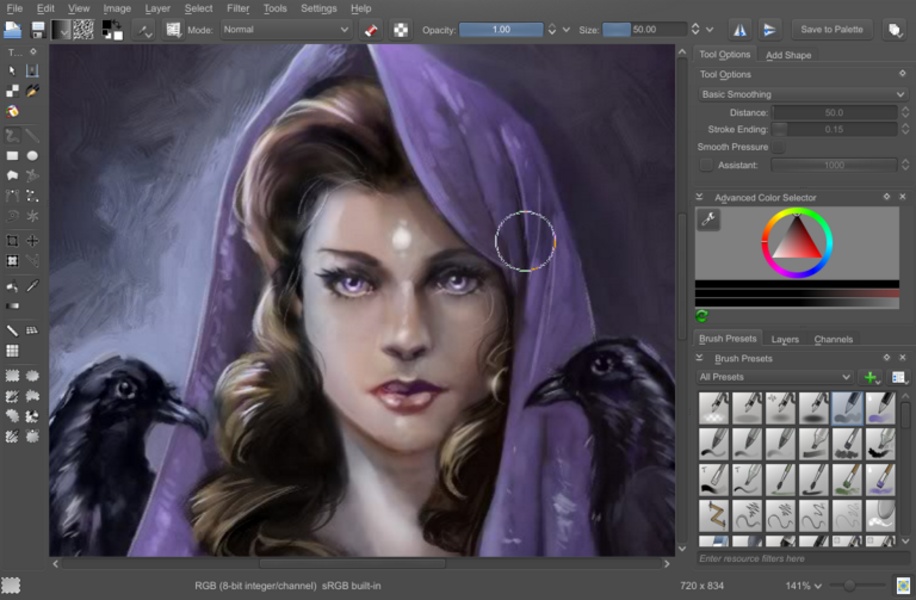
The UI is cleaner, more responsive, and easier to navigate. Panels load faster, and the software’s dark theme has improved readability.
New users will find the interface intuitive, while experienced artists can customize it to match their workflow.
2.4 Stability Fixes
Krita 5.3.2 fixes numerous crashes and performance issues related to:
-
Layer handling
-
Brush presets
-
File saving
-
Animation playback
-
Color management
Large projects, especially those with many layers, run better than ever.
2.5 Compatibility Improvements
Krita now works more smoothly across:
-
Windows 10 & 11
-
macOS
-
Linux distributions
Tablet compatibility also improves, ensuring better pressure sensitivity and tilt support.
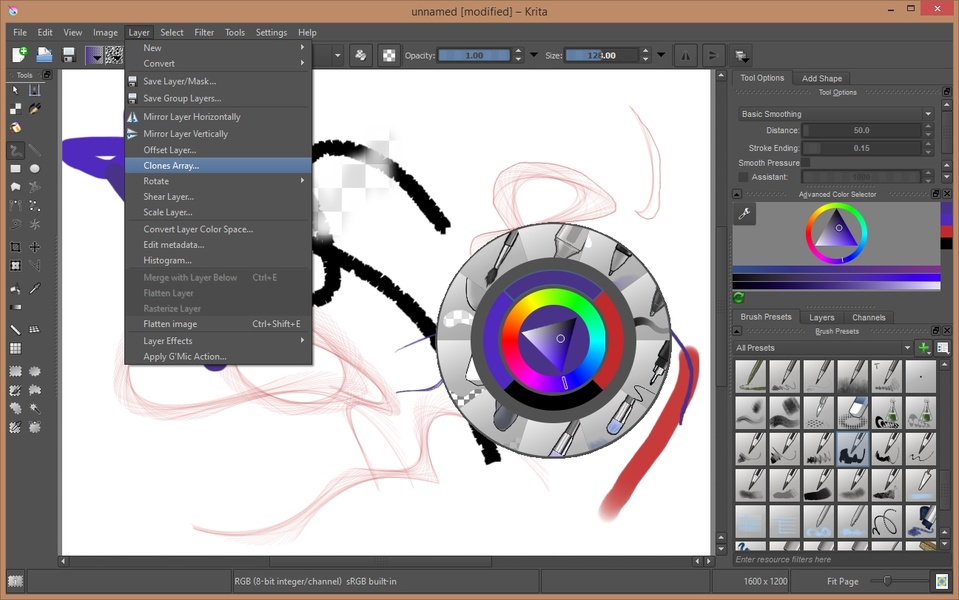
3. Krita’s Interface and Customization Options
Krita’s interface is clean, modern, and highly customizable. Artists can rearrange panels, create custom workspaces, and place tools exactly where they want.
Some notable UI features:
3.1 Dockers
Dockers allow users to access:
-
Layers
-
Brushes
-
Color selectors
-
Timeline
-
Tool options
-
Gradients
-
Vector tools
Each docker can be pinned, moved, floated, or hidden, offering a flexible workspace like professional art software.
3.2 Workspace Presets
Krita includes workspace presets for:
-
Animation
-
Painting
-
Vector art
-
Compositing
-
Minimal mode
Artists can also save their own layouts.
3.3 Dark and Light Themes
Krita offers multiple themes for better visibility and comfort, especially during long painting sessions.
4. Brush Engine: The Heart of Krita
Krita’s brush engine is its most celebrated feature. With one of the largest and most customizable brush libraries in the industry, Krita supports more than 100 brush engines and presets.
4.1 Brush Customization
Artists can control:
-
Shape
-
Smudge strength
-
Texture maps
-
Rotation
-
Jitter
-
Stabilizer strength
-
Opacity curve
-
Fade settings
Each brush can be saved as a preset with custom icons and tags.
4.2 Brush Stabilizers
Krita’s stabilizers make it ideal for:
-
Line art
-
Calligraphy
-
Inking
-
Smooth curves
The “drag” and “weighted” stabilizers help achieve clean lines even without a steady hand.
4.3 Brush Performance in 5.3.2
Brushes now load faster, respond better on high-resolution canvases, and feel much more natural. This makes Krita 5.3.2 an excellent choice for illustrators and comic artists.
5. Layers, Masking & Non-Destructive Workflow
Krita offers a powerful layer system supporting:
-
Raster layers
-
Vector layers
-
Fill layers
-
Filter layers
-
Clone layers
-
Group layers
5.1 Masking Tools
Artists can use:
-
Filter masks
-
Selection masks
-
Transparency masks
-
Transform masks
Masking allows non-destructive editing, giving full creative control without altering original artwork.
5.2 Layer Effects
Krita supports real-time effects such as:
-
Drop shadow
-
Glow
-
Overlay
-
Blending modes
These are useful for digital painting, UI design, comics, and concept art.
6. Advanced Color Management
Krita provides professional-level color features, including:
-
HDR painting
-
CMYK support
-
ICC color profiles
-
Wide-gamut color spaces
-
LUT support
Artists in print, animation, and film industries rely on Krita for accurate color output.
7. Krita for Animation
Krita includes a full 2D animation system that supports:
-
Hand-drawn frame animation
-
Onion skins
-
Keyframes
-
Tweening for opacity and transforms
-
Audio playback
-
Export to MP4, GIF, WebM, and image sequences
Why animators love Krita:
-
Natural drawing experience
-
Professional-grade brushes
-
Timeline similar to industry tools
-
No subscription fees
-
High-quality output
Krita 5.3.2’s improved animation performance makes it even more reliable for indie animators.
8. Vector Tools and Shapes
Krita includes a vector toolset for:https://scorpioagersoftware.com/
-
Comics speech bubbles
-
Shapes
-
Lines
-
Text
-
Paths
While not as advanced as Illustrator or Inkscape, Krita’s vector tools are useful for hybrid art workflows.
9. File Support and Export Options
Krita supports a wide range of file types:
Import/Export Formats:
-
PNG
-
JPG
-
TIFF
-
PSD
-
SVG
-
WebP
-
GIF
-
EXR
-
HEIF
-
MP4 (animation export)
PSD support makes Krita compatible with Photoshop workflows.
10. Performance and System Requirements
Krita is optimized to work on low-end and high-end systems alike.
Performance improvements in 5.3.2:
-
Faster startup
-
Lower RAM consumption
-
Better handling of large canvases
-
Improved tablet response
-
Smoother animation playback
Krita is lightweight compared to many industry tools, making it ideal for all types of hardware.
11. Who Should Use Krita 5.3.2?
Krita is perfect for:
Digital Artists
Painting, character art, and environment design.
Comic & Manga Creators
Panels, inking tools, filters, speech bubbles, and vector/text tools.
Concept Artists
Fast sketching, matte painting, color design, and ideation.
Animators
2D frame-by-frame animation with full brush control.
Beginners
Free, easy to use, and loaded with tutorials.
12. Final Verdict on Krita 5.3.2
Krita 5.3.2 is one of the best free digital painting software tools available—competing directly with paid tools like Photoshop, Clip Studio Paint, and Corel Painter. With an advanced brush engine, animation tools, powerful layering system, professional color workflows, and continuous improvements, Krita delivers everything an artist needs.
Whether you’re painting, animating, designing a comic, or sketching character concepts, Krita 5.3.2 provides a smooth, flexible, and professional creative experience.
It is stable, powerful, customizable, and completely free—making it a perfect choice for artists in 2025 and beyond.