AOMEI Partition Assistant 10.2.2 – Comprehensive Disk and Partition Management Software
AOMEI Partition Assistant 10.2.2 is a powerful and reliable disk partition management solution designed for Windows users who want full control over their storage devices. From basic partition tasks to advanced disk operations, the software provides a complete toolkit for managing hard drives, SSDs, and external storage safely and efficiently.
Known for its user-friendly interface and robust functionality, AOMEI Partition Assistant has earned a strong reputation among home users, professionals, and IT administrators. Version 10.2.2 continues this tradition by delivering improved stability, better performance, and enhanced compatibility with modern hardware and operating systems.
This article provides an in-depth overview of AOMEI Partition Assistant 10.2.2, exploring its features, usability, safety mechanisms, performance, and practical use cases.
1. Overview of AOMEI Partition Assistant
AOMEI Partition Assistant is a disk management utility that allows users to create, resize, move, merge, split, format, and manage disk partitions without data loss. It supports a wide range of storage devices, including HDDs, SSDs, NVMe drives, USB drives, and memory cards.
The software is designed to simplify complex disk operations, making advanced storage management accessible even to users with limited technical knowledge.
2. What’s New in Version 10.2.2
AOMEI Partition Assistant 10.2.2 focuses on refinement and reliability.
Key improvements include:
-
Enhanced stability during partition resizing and moving
-
Improved compatibility with Windows 10 and Windows 11
-
Better support for large-capacity disks
-
Optimized performance for SSD and NVMe storage
-
Bug fixes and interface enhancements
These updates ensure smoother operations and a more reliable user experience.
3. User Interface and Ease of Use
3.1 Clean and Intuitive Design
The interface of AOMEI Partition Assistant is clean and well-organized. All disks and partitions are displayed visually, allowing users to understand their storage layout at a glance.
3.2 Guided Operations
Most tasks are guided through simple steps, reducing the risk of errors. Users select an operation, preview the result, and then apply changes when ready.
3.3 Pending Operations System
Changes are queued as pending operations and only applied after confirmation. This design allows users to review and cancel actions before they affect the disk.
4. Core Partition Management Features
AOMEI Partition Assistant 10.2.2 provides a full suite of partition management tools.
4.1 Resize and Move Partitions
Users can resize partitions to allocate more or less space without deleting data. Partitions can also be moved to reorganize disk layouts, which is useful when extending system drives.
4.2 Create and Delete Partitions
The software allows quick creation of new partitions from unallocated space and safe deletion of partitions that are no longer needed.
4.3 Merge and Split Partitions
Users can merge two adjacent partitions into one or split a large partition into smaller sections for better data organization.
5. Formatting and File System Management
Formatting is handled safely and efficiently.
Supported file systems include:
-
NTFS
-
FAT32
-
exFAT
-
EXT file systems
Users can choose the appropriate file system depending on their storage needs and compatibility requirements.
6. Disk and Partition Conversion Tools
AOMEI Partition Assistant 10.2.2 includes advanced conversion features that work without data loss.
6.1 MBR to GPT Conversion
Users can convert disks from MBR to GPT format without reinstalling Windows, enabling support for modern systems and large drives.
6.2 File System Conversion
The software supports conversion between file systems, such as FAT32 to NTFS, without formatting.
6.3 Primary and Logical Partition Conversion
Partitions can be converted between primary and logical formats to meet system or boot requirements.
7. OS Migration and Disk Cloning
AOMEI Partition Assistant offers powerful migration and cloning tools.
7.1 Migrate OS to SSD or HDD
Users can migrate their operating system to a new drive without reinstalling Windows, preserving applications and settings.
7.2 Disk and Partition Clone
The cloning feature allows users to copy entire disks or individual partitions, making it ideal for upgrades, backups, and hardware replacement.
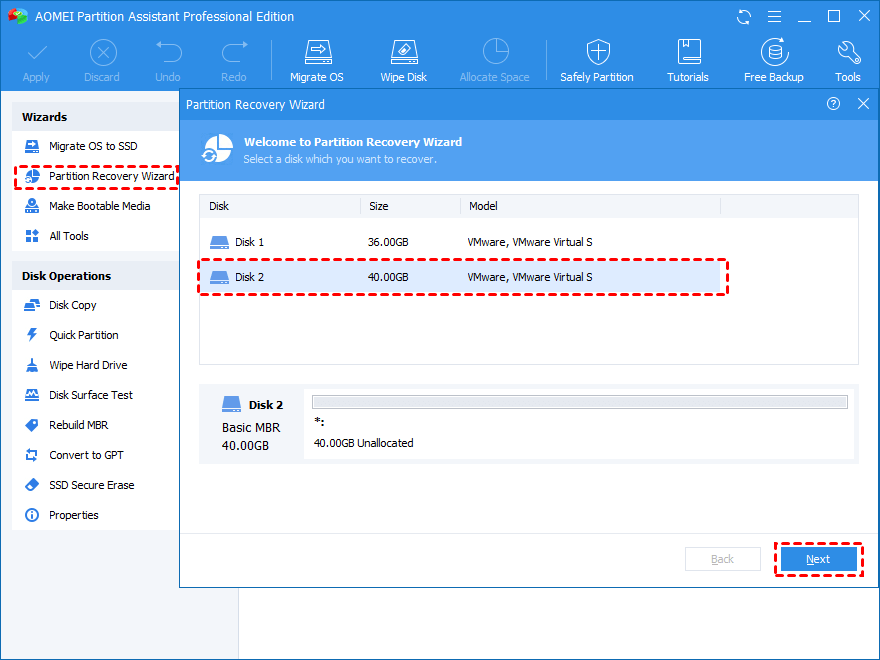
8. Partition and Disk Recovery Features
Data loss due to accidental deletion or corruption can be stressful. AOMEI Partition Assistant includes recovery tools to address such issues.
Recovery features include:
-
Scanning disks for lost partitions
-
Restoring partition tables
-
Recovering access to existing data
These tools help minimize downtime and data loss.
9. Data Protection and Safety Mechanisms
AOMEI places strong emphasis on data safety.
9.1 Non-Destructive Operations
Most operations are designed to preserve data whenever possible.
9.2 Pre-Execution Checks
The software checks tasks before execution to reduce the risk of errors.
9.3 Stable Execution Engine
A reliable execution engine ensures disk operations are performed safely, even during long processes.
10. Performance and Efficiency
AOMEI Partition Assistant 10.2.2 is optimized for modern systems.
Performance benefits include:
-
Faster execution of disk operations
-
Efficient handling of large partitions
-
Low system resource usage
-
Stable performance during extended tasks
These improvements make it suitable for both personal and professional use.
11. SSD and NVMe Optimization
Modern storage technologies are fully supported.
Key advantages include:
-
Proper partition alignment
-
Improved SSD performance
-
Extended lifespan of solid-state drives
These optimizations ensure maximum efficiency on modern hardware.
12. Bootable Media and Offline Management
AOMEI Partition Assistant allows users to create bootable media.
Benefits include:
-
Manage disks without loading Windows
-
Repair partition issues on unbootable systems
-
Perform safe recovery and maintenance tasks
This feature is invaluable in emergency or recovery scenarios.
13. Compatibility and System Support
AOMEI Partition Assistant 10.2.2 supports a wide range of systems, including:
-
Windows 10
-
Windows 11
-
32-bit and 64-bit architectures
-
UEFI and legacy BIOS systems
It works seamlessly with both older and modern hardware.
14. Who Should Use AOMEI Partition Assistant 10.2.2?
Home Users
For organizing personal storage and upgrading drives.
Professionals
For managing workstations and optimizing disk layouts.
IT Administrators
For handling disk configurations across multiple systems.
Gamers
For efficiently allocating space for large game libraries.
Businesses
For maintaining stable and organized storage environments.
15. Advantages of AOMEI Partition Assistant 10.2.2
-
Easy-to-use interface
-
Powerful partition tools
-
Safe data handling
-
OS migration and cloning
-
Disk and file system conversion
-
Partition recovery features
-
SSD optimization
16. Comparison with Windows Disk Management
Compared to built-in Windows tools, AOMEI Partition Assistant offers:
-
More advanced features
-
Safer resizing and merging
-
OS migration support
-
Recovery and conversion tools
-
Better visualization of disk layouts
This makes it a superior choice for advanced disk management tasks.
17. Practical Use Cases
AOMEI Partition Assistant 10.2.2 is ideal for:
-
Expanding system partitions
-
Migrating Windows to SSDs
-
Creating multi-partition setups
-
Recovering lost partitions
-
Optimizing disk performance
18. Final Verdict
AOMEI Partition Assistant 10.2.2 is a powerful, stable, and user-friendly disk management solution that meets the needs of modern Windows users. With its comprehensive feature set, strong emphasis on data safety, and excellent compatibility with current storage technologies, it stands out as one of the best partition management tools available.
Whether you are a beginner managing personal storage or a professional handling complex disk configurations, AOMEI Partition Assistant 10.2.2 delivers reliability, efficiency, and confidence in every operation.
MiniTool Partition Wizard 12.9 Free Download For Window 2026



