Alfred 4 – The Ultimate Productivity App for macOS Users
Introduction
In the fast-paced world of technology, productivity is everything. Whether you’re a developer, designer, writer, or business professional, the ability to quickly access files, launch applications, search the web, and automate repetitive tasks can make a huge difference in daily efficiency. Alfred 4, developed by Running with Crayons Ltd, is one of the most powerful and beloved productivity tools available for macOS.https://scorpioagersoftware.com/
This intelligent app transforms how users interact with their Mac, combining search, automation, and workflow management into one streamlined experience. Alfred 4 isn’t just an app launcher — it’s a complete command center that helps you take control of your computer and work faster, smarter, and more efficiently.
What Is Alfred 4?
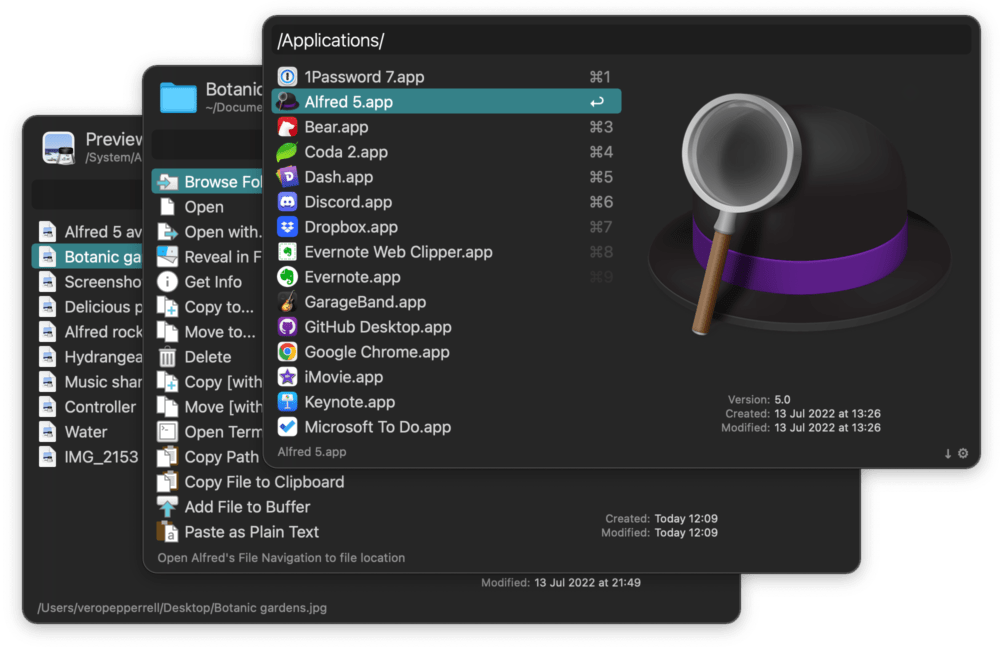
Alfred 4 is an advanced productivity and workflow automation app for macOS that replaces the traditional Spotlight search with a more powerful, customizable interface. It allows users to launch applications, search files, control their system, and perform web searches directly from the keyboard — all within seconds.
Unlike Spotlight, Alfred 4 offers advanced features such as clipboard history, text snippets, workflow automation, file navigation, and integration with third-party tools like 1Password, Terminal, and AppleScript. It’s designed to minimize friction between you and your Mac, helping you get more done with fewer clicks.https://scorpioagersoftware.com/
Key Features of Alfred 4
1. Lightning-Fast Search and Launch
Alfred’s search engine is faster and smarter than Spotlight. Users can instantly find files, folders, apps, and documents by typing a few letters. The app learns your habits over time, predicting what you’re looking for based on usage patterns.
2. Powerful Workflows
One of Alfred 4’s standout features is its Workflows system. These workflows allow users to create automated sequences that integrate different apps and commands.
You can:
-
Run shell scripts
-
Integrate with APIs
-
Launch multiple apps with one shortcut
-
Create custom keyword triggers
This transforms Alfred into an automation powerhouse — similar to macOS Shortcuts, but far more customizable and advanced.
3. Clipboard History and Snippets
Alfred 4 stores your clipboard history, so you can quickly retrieve text, files, or images copied earlier. The Snippets feature allows you to store frequently used text like email signatures or code blocks and paste them with a simple shortcut.
4. System Commands and Controls
Control your Mac without touching the mouse. Alfred 4 allows you to:
-
Empty the Trash
-
Restart or shut down your system
-
Mute sound
-
Control screen brightness and volume
These shortcuts help users manage their system quickly and effortlessly.
5. Integration with 1Password
Alfred 4 seamlessly integrates with 1Password, allowing users to securely search and open saved logins. This feature saves time while maintaining strong password security.
6. File Navigation
Instead of browsing manually, you can type to open, move, copy, or email files instantly. This makes file management much more efficient and intuitive.
7. Custom Themes and Appearance
Alfred 4 introduces beautiful themes that can be customized to fit your workspace aesthetics. You can adjust colors, fonts, transparency, and layout — creating a workspace that feels uniquely yours.
Performance and Efficiency
Alfred 4 is designed to be lightweight yet powerful. It runs quietly in the background, using minimal system resources while being instantly available with a quick keyboard shortcut (by default, Option + Space). The app’s responsiveness and predictive learning make it feel like an extension of the macOS system itself.
Users often report significant improvements in daily productivity — performing tasks that used to take minutes in just seconds.
Alfred Powerpack – Unlocking the Full Potential
While Alfred 4 is free to download and use, its Powerpack upgrade unlocks the full range of advanced features. The Powerpack includes:
-
Workflows automation
-
Clipboard history
-
Text snippets
-
File navigation tools
-
1Password integration
-
Custom themes and actions
For professional users, this upgrade is essential. It transforms Alfred from a simple launcher into an automation engine that can completely reshape how you use your Mac.https://scorpioagersoftware.com/
Benefits of Using Alfred 4
1. Save Time
Alfred 4 dramatically cuts down on the time spent searching, clicking, or navigating menus. Everything is accessible from your keyboard.
2. Improved Focus
By minimizing distractions and eliminating unnecessary mouse usage, Alfred helps you maintain your workflow and stay in the zone.
3. Boosted Productivity
Whether you’re coding, designing, or managing files, Alfred’s workflows and shortcuts save hours of repetitive work.
4. Enhanced Customization
You can tailor Alfred 4 to your exact needs — from personalized themes to fully automated workflows.
5. Smarter Automation
With the Powerpack, Alfred can connect apps, scripts, and system commands into custom processes that run instantly.
Comparison: Alfred 4 vs Spotlight
| Feature | Alfred 4 | Spotlight |
|---|---|---|
| Speed | Very Fast | Moderate |
| Customization | High | Limited |
| Automation (Workflows) | Yes | No |
| Clipboard History | Yes | No |
| Integration (1Password, Scripts) | Yes | Limited |
| Price | Free / Paid | Free (Built-in) |
Alfred clearly outperforms Spotlight when it comes to customization, extensibility, and automation. For users who rely heavily on productivity, Alfred 4 is the obvious choice.https://scorpioagersoftware.com/
User Experience
Alfred 4’s interface is intuitive, minimalist, and designed for speed. The developers have focused on making every interaction smooth and frictionless. Users can customize their themes for both light and dark modes, and the workflow editor uses a simple drag-and-drop interface, making even complex automation easy to build.
Professionals, developers, and power users across the globe rely on Alfred 4 daily. Its reputation in the macOS ecosystem is comparable to that of productivity giants like Keyboard Maestro and Hazel.
System Requirements
To run Alfred 4 effectively, your Mac should meet the following requirements:
-
macOS 10.13 High Sierra or later
-
At least 100 MB free disk space
-
Internet connection for workflow updates (optional)
The app runs efficiently even on older Macs, thanks to its lightweight design.
Privacy and Security
Alfred 4 places strong emphasis on user privacy. None of your data or search history is uploaded to external servers. Clipboard items, workflows, and preferences are all stored locally on your machine. This makes Alfred 4 not only fast but also secure and privacy-friendly.https://scorpioagersoftware.com/
Use Cases of Alfred 4
1. Developers
Run terminal commands, search documentation, or launch scripts — all without leaving the keyboard.
2. Writers
Store text snippets, open projects, or search files instantly. Perfect for content creators and bloggers.
3. Designers
Quickly open design tools, manage assets, and create workflows that automate project setup.
4. Business Professionals
Use Alfred to organize emails, schedule meetings, and automate file organization tasks.
Recent Improvements in Alfred 4
The latest updates have made Alfred 4 even more powerful:
-
Enhanced Workflow Editor with better visuals and faster loading.
-
Improved Clipboard Manager with search and filtering.
-
Smoother integration with modern macOS versions.
-
Refined snippets engine for better text expansion accuracy.
-
Optimized memory usage and startup performance.
These updates ensure Alfred remains at the forefront of macOS productivity tools.
Why Alfred 4 Remains Essential in 2025
Even in 2025, Alfred 4 stands tall as one of the most reliable productivity tools for Mac users. Competing tools like Raycast and LaunchBar have emerged, but Alfred’s combination of speed, stability, and deep customization keeps it ahead of the competition.
For anyone serious about improving their workflow, Alfred 4 is not just an app — it’s a daily companion that transforms the Mac experience.
Conclusion
Alfred 4 represents the perfect balance of speed, power, and customization. Whether you’re an everyday Mac user or a power professional, it empowers you to do more in less time. From launching apps to automating complex tasks, Alfred redefines what productivity means on macOS.
If your goal is to make your workflow faster, smoother, and smarter, Alfred 4 is the essential tool that will help you achieve it.
Avid Media Composer 2025 – Advanced Editing for Filmmakers
Alfred 4 – Smart Productivity and Automation App for macOS