Adobe Photoshop 2025 (v26.0) – Complete Review, Features, Performance, and System Requirements
Introduction to Adobe Photoshop 2025 (v26.0)
Adobe Photoshop 2025 (v26.0) is the latest major release of the world’s most powerful and widely used image editing software. For decades, Photoshop has been the industry standard for photo editing, graphic design, digital art, and visual content creation. With version 26.0, Adobe continues its focus on artificial intelligence, performance optimization, and professional-grade creative tools.
Adobe Photoshop 2025 is designed for photographers, designers, content creators, marketers, and digital artists who demand precision, speed, and creative freedom. This release builds on previous versions by enhancing AI-powered features, refining workflows, and improving overall stability across supported platforms.
In this article, we will explore Adobe Photoshop 2025 (v26.0) in detail, including new features, core tools, performance improvements, system requirements, pros and cons, and who should use it.
What Is Adobe Photoshop?
Adobe Photoshop is a professional raster graphics editor developed by Adobe Inc. It is used worldwide for:
-
Photo editing and retouching
-
Graphic design
-
Digital painting and illustration
-
Web and UI design
-
Marketing and social media visuals
-
Product mockups and branding
Photoshop supports layers, masks, filters, blending modes, and advanced color management, making it suitable for both beginners and professionals.
Adobe Photoshop 2025 (v26.0) continues this legacy while introducing smarter and faster tools.
What’s New in Adobe Photoshop 2025 (v26.0)
Adobe Photoshop 2025 focuses heavily on AI-driven creativity and workflow efficiency.
Key Highlights of Photoshop 2025 (v26.0)
-
Enhanced Generative AI tools
-
Improved object selection accuracy
-
Faster performance on modern hardware
-
Better GPU acceleration
-
Refined user interface elements
-
Bug fixes and stability improvements
These updates make daily editing tasks smoother and more intuitive.
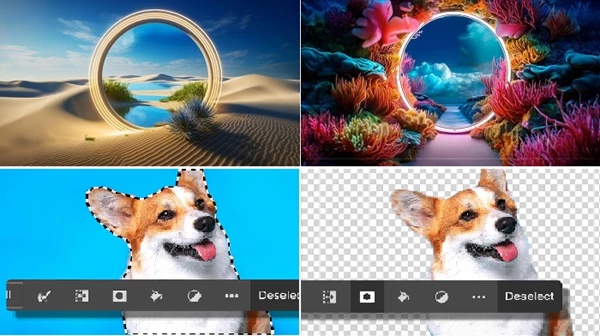
AI-Powered Features in Photoshop 2025
Artificial intelligence is at the core of Photoshop 2025 (v26.0). Adobe Sensei AI plays a major role in automating complex tasks.
Generative Fill and Expand
One of the most powerful features is Generative Fill, which allows users to add, remove, or replace objects in images using text prompts. You can simply describe what you want, and Photoshop generates realistic results.
Generative Expand helps extend images beyond their original borders while maintaining visual consistency. This is especially useful for social media banners, thumbnails, and marketing designs.
Improved Object Selection
Photoshop 2025 improves object detection significantly. Selecting people, animals, objects, or backgrounds is faster and more accurate, even in complex images.
This saves time and reduces the need for manual refinements.
Core Editing Tools in Adobe Photoshop 2025
Despite the new AI features, Photoshop 2025 remains a powerful manual editing tool.
Layers and Masks
Layers allow users to work non-destructively. You can stack images, text, shapes, and effects without damaging the original content.
Masks let you hide or reveal parts of a layer with precision, which is essential for professional photo manipulation.
Brushes and Drawing Tools
Photoshop 2025 offers advanced brush controls for digital artists. You can customize:
-
Brush size
-
Opacity
-
Flow
-
Texture
-
Pressure sensitivity
This makes Photoshop ideal for illustrators and concept artists.
Filters and Effects
Photoshop includes hundreds of filters and effects, ranging from basic blur and sharpening to artistic and neural filters. Neural Filters use AI to apply effects such as skin smoothing, style transfer, and colorization.
Photo Retouching and Enhancement
Adobe Photoshop 2025 is widely used for professional photo retouching.
Key Retouching Tools
-
Spot Healing Brush
-
Clone Stamp
-
Content-Aware Fill
-
Dodge and Burn
-
Liquify Tool
These tools allow photographers to remove imperfections, adjust lighting, and enhance details while keeping images natural-looking.
Graphic Design and Typography
Photoshop 2025 includes robust typography and design tools.
Text and Fonts
You can add and edit text layers with full control over:
-
Fonts
-
Spacing
-
Alignment
-
Effects
Adobe Fonts integration gives access to thousands of high-quality fonts without additional cost.
Shapes and Smart Objects
Vector shapes and smart objects help maintain design quality at any resolution. Smart objects allow you to edit content without losing original quality.
Performance and Speed Improvements
Performance is a major focus of Adobe Photoshop 2025 (v26.0).
What’s Improved?
-
Faster startup times
-
Smoother zooming and panning
-
Better handling of large files
-
Improved multi-core CPU usage
-
Enhanced GPU acceleration
These improvements are noticeable, especially when working with high-resolution images and complex projects.
Cross-Platform Support
Windows and macOS
Adobe Photoshop 2025 is fully supported on both Windows and macOS. The experience is consistent across platforms, with optimized performance on modern systems.
Apple Silicon Support
Photoshop 2025 runs natively on Apple Silicon (M1, M2, and later), delivering faster performance and better energy efficiency on Mac devices.
File Format Support
Photoshop 2025 supports a wide range of file formats, including:
-
PSD
-
PSB
-
JPEG
-
PNG
-
TIFF
-
GIF
-
WebP
-
PDF
This makes it easy to work with images from different sources and export content for various platforms.
Cloud Integration and Adobe Creative Cloud
Adobe Photoshop 2025 is part of the Adobe Creative Cloud ecosystem.
Benefits of Creative Cloud Integration
-
Cloud storage
-
File syncing across devices
-
Easy collaboration
-
Access to Adobe Fonts and Stock
-
Regular updates
You can start a project on one device and continue it on another seamlessly.
Security and Reliability
Adobe regularly releases security updates to protect users. Photoshop 2025 benefits from Adobe’s strong focus on software security, stability, and bug fixing.
User data stored in Creative Cloud is protected using industry-standard security practices.
System Requirements for Adobe Photoshop 2025 (v26.0)
Minimum System Requirements
| Component | Requirement |
|---|---|
| OS | Windows 10 (64-bit) / macOS 12 or later |
| Processor | Multi-core Intel or AMD |
| RAM | 8 GB (16 GB recommended) |
| Storage | 20 GB free space |
| GPU | DirectX 12 compatible |
An internet connection is required for activation and cloud features.
Pricing and Licensing
Adobe Photoshop 2025 is available through a subscription model.
Available Plans
-
Photoshop Single App Plan
-
Photography Plan (Photoshop + Lightroom)
-
Adobe Creative Cloud All Apps
Subscriptions include regular updates and access to cloud services.
Advantages of Adobe Photoshop 2025 (v26.0)
-
Industry-leading image editing tools
-
Powerful AI features
-
Excellent performance
-
Wide format support
-
Professional-grade output
-
Strong community and tutorials
Limitations of Adobe Photoshop 2025
-
Subscription-based pricing
-
Steep learning curve for beginners
-
Requires powerful hardware for best performance
Despite these limitations, Photoshop remains unmatched in its category.
Adobe Photoshop 2025 vs Alternatives
Photoshop vs GIMP
-
Photoshop offers advanced AI and professional tools
-
GIMP is free but lacks polish and AI features
Affinity Photo
-
Photoshop has better ecosystem integration
-
Affinity Photo offers one-time purchase
Canva
-
Photoshop is professional-grade
-
Canva is beginner-friendly but limited
Who Should Use Adobe Photoshop 2025?
Adobe Photoshop 2025 (v26.0) is ideal for:
-
Photographers
-
Graphic designers
-
Digital artists
-
Marketing professionals
-
Content creators
-
UI/UX designers
If image quality, flexibility, and creative control matter to you, Photoshop is the right choice.
Conclusion
Adobe Photoshop 2025 (v26.0) is a powerful, refined, and future-ready image editing solution. With advanced AI features, improved performance, and deep Creative Cloud integration, it continues to set the standard for digital creativity.
While the subscription cost and learning curve may not suit everyone, professionals and serious creators will find Adobe Photoshop 2025 to be an essential tool. If you are looking for the best image editing software available today, Photoshop 2025 remains the top choice.
 Download Notion 3.16.2 – Latest Version


