HSMWorks 2025 (v24.0) – Powerful Integrated CAM Solution for Efficient CNC Machining
HSMWorks 2025 (v24.0) is a professional computer-aided manufacturing (CAM) software designed to integrate seamlessly with CAD environments for efficient CNC machining. Developed by Autodesk, HSMWorks is widely recognized for its powerful machining capabilities, high-speed toolpath generation, and smooth integration with design workflows. The software is particularly popular among engineers, machinists, and manufacturing professionals who require precise and efficient machining strategies directly within their design environment.
With the release of HSMWorks 2025, Autodesk continues to improve performance, usability, and machining efficiency. The latest version includes enhancements to toolpath calculation, simulation, and workflow automation, making it easier for users to produce high-quality CNC programs with minimal effort. Whether you are producing prototypes, custom parts, or high-volume production components, HSMWorks 2025 offers the tools needed to optimize manufacturing processes.
Introduction to HSMWorks 2025
HSMWorks is designed to bridge the gap between design and manufacturing by providing advanced CAM functionality directly inside the CAD workspace. This integrated approach allows engineers and machinists to create machining strategies while working with the same model used for design, eliminating the need for file transfers and reducing potential errors.
HSMWorks 2025 focuses on improving productivity by offering faster toolpath generation, smarter machining strategies, and improved simulation tools. These enhancements allow manufacturers to reduce programming time while maintaining high machining accuracy and efficiency.
The software supports a wide range of machining operations, including milling, drilling, and multi-axis machining. This versatility makes HSMWorks suitable for industries such as aerospace, automotive, medical manufacturing, and general engineering.

Seamless CAD Integration
One of the most significant advantages of HSMWorks is its deep integration with CAD software. Instead of switching between separate design and CAM applications, users can perform machining operations directly within the CAD environment.
This integration provides several benefits:
-
Faster workflow between design and manufacturing
-
Reduced file compatibility issues
-
Real-time updates when design changes occur
-
Improved collaboration between engineers and machinists
When a design modification is made, HSMWorks automatically updates the associated toolpaths. This associativity ensures that machining strategies remain consistent with the latest design revisions.
User Interface and Workflow
HSMWorks 2025 features a user-friendly interface designed to simplify complex machining tasks. The layout is organized and intuitive, allowing users to access tools quickly and efficiently.
The software provides a structured workflow that guides users through the machining process, from model setup to toolpath generation and simulation. Toolbars and menus are clearly arranged, and commands are logically grouped, making it easy for both beginners and experienced users to navigate the software.
Customizable workspaces allow users to adjust the interface according to their preferences. This flexibility helps machinists focus on their specific tasks without unnecessary distractions.
Advanced Toolpath Strategies
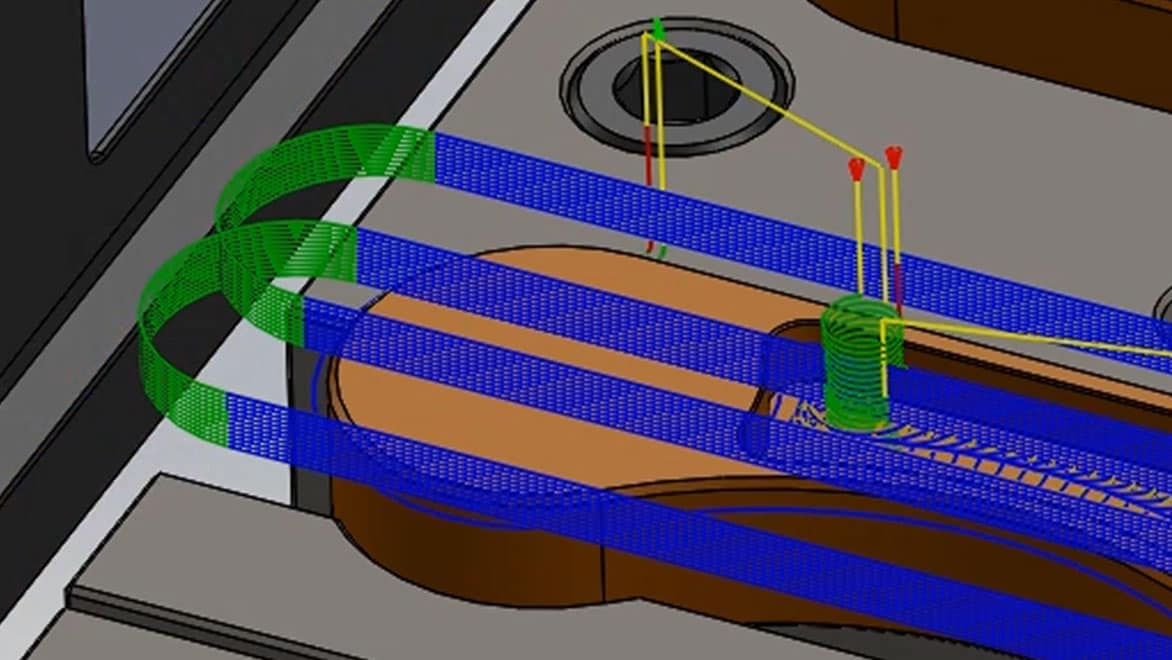
HSMWorks 2025 includes a comprehensive set of toolpath strategies designed to maximize machining efficiency and accuracy. These strategies enable users to create optimized cutting paths that reduce machining time while maintaining excellent surface quality.
Adaptive Clearing
Adaptive clearing is one of the most advanced roughing strategies available in HSMWorks. It removes large amounts of material quickly while maintaining consistent tool engagement. This reduces tool wear and improves machining stability.
Pocket and Contour Milling
Pocket and contour toolpaths are commonly used for machining cavities, profiles, and complex shapes. HSMWorks calculates efficient cutting paths that minimize unnecessary movements and improve overall machining performance.
Finishing Strategies
Finishing toolpaths are designed to produce smooth surfaces and precise details. These strategies are particularly useful for molds, dies, and high-precision components where surface quality is critical.
Multi-Axis Machining
HSMWorks 2025 supports multi-axis machining, allowing manufacturers to create complex parts with greater precision. Multi-axis machining enables the cutting tool to approach the workpiece from different angles, reducing the need for multiple setups.
This capability offers several advantages:
-
Improved machining accuracy
-
Reduced setup time
-
Ability to machine complex geometries
-
Better surface finish
Multi-axis machining is especially valuable in industries such as aerospace and medical device manufacturing, where complex shapes and tight tolerances are common.
Drilling and Hole Machining
Drilling operations are essential in many machining projects. HSMWorks 2025 provides powerful drilling tools that support a wide range of hole-making strategies.
These include:
-
Simple drilling
-
Peck drilling
-
Deep drilling
-
Tapping operations
The software automatically recognizes hole features in the model, allowing users to apply drilling strategies quickly and efficiently.
Simulation and Verification
Before sending CNC programs to the machine, it is important to verify the machining process. HSMWorks 2025 includes advanced simulation tools that allow users to visualize the entire machining operation.
Simulation features include:
-
Toolpath visualization
-
Material removal simulation
-
Collision detection
-
Machine movement analysis
These tools help users identify potential problems before machining begins, reducing the risk of costly errors and improving production reliability.
Automation and Productivity Features
Automation plays a crucial role in modern manufacturing. HSMWorks 2025 includes features that automate repetitive tasks and streamline the programming process.
Tool Libraries
The software includes customizable tool libraries that allow users to store and manage commonly used cutting tools. This saves time when setting up new machining operations.
Templates
Machining templates allow users to reuse proven strategies across multiple projects. Templates help standardize processes and ensure consistent results.
Automatic Updates
Because HSMWorks is integrated with CAD software, toolpaths automatically update when the design changes. This reduces manual adjustments and ensures that machining operations always match the latest design.
Post-Processing and CNC Compatibility
Once the machining strategies are complete, HSMWorks generates CNC code that can be used by various machine controllers. The software supports a wide range of post-processors, ensuring compatibility with different CNC machines.https://scorpioagersoftware.com/
Users can customize post-processors to match the requirements of specific machines, ensuring accurate and reliable machine instructions.
Performance Improvements in HSMWorks 2025
The 2025 release includes several performance improvements designed to enhance productivity.
Key improvements include:
-
Faster toolpath calculation
-
Improved stability and reliability
-
Better handling of large models
-
Optimized simulation performance
These enhancements ensure that users can work efficiently even when dealing with complex machining projects.
Supported File Formats
HSMWorks supports many common CAD file formats, allowing users to import models from various design platforms.
Common supported formats include:
-
STEP
-
IGES
-
STL
-
SAT
This flexibility ensures compatibility with a wide range of design workflows.
Industries That Use HSMWorks
HSMWorks is widely used across multiple manufacturing industries.
Aerospace
Manufacturers use HSMWorks to produce aircraft components that require extremely high precision.
Automotive
Automotive engineers rely on HSMWorks to machine engine parts, molds, and prototypes.
Medical Manufacturing
Medical device manufacturers use HSMWorks to create surgical tools and implants with precise tolerances.
General Engineering
Many engineering companies use HSMWorks for custom parts, prototypes, and production components.
Advantages of HSMWorks 2025
HSMWorks 2025 offers several benefits that make it a valuable CAM solution.
-
Seamless integration with CAD software
-
Advanced toolpath strategies for efficient machining
-
Multi-axis machining support
-
Powerful simulation and verification tools
-
Automation features for faster programming
-
Compatibility with a wide range of CNC machines
These features help manufacturers improve productivity while maintaining high machining quality.
System Requirements
To run HSMWorks 2025 efficiently, users should have a modern workstation.
Typical requirements include:
-
Windows 10 or Windows 11 (64-bit)
-
Multi-core processor
-
Minimum 16 GB RAM
-
Dedicated graphics card
-
SSD storage for faster performance
A powerful system ensures smooth operation and faster toolpath calculations.
Conclusion
HSMWorks 2025 (v24.0) is a powerful and versatile CAM solution designed to streamline the manufacturing process by integrating machining capabilities directly within the CAD environment. Its advanced toolpath strategies, multi-axis machining support, and intelligent automation tools make it an excellent choice for engineers and machinists working on complex CNC machining projects.
The latest version improves performance, enhances workflow efficiency, and provides more reliable simulation tools, helping manufacturers produce high-quality parts while reducing programming time and machining costs.
Autodesk HSMWorks Ultimate 2025 (v7.17) Windows Download