SketchUp Pro 2025 (v24.1.3) – Complete 3D Modeling Solution for Designers & Architects
SketchUp Pro 2025 (version 24.1.3) is the latest professional release of one of the world’s most popular 3D modeling applications. Developed by Trimble Inc., SketchUp has built a reputation for being intuitive, powerful, and flexible. The 2025 version enhances modeling performance, improves interoperability, and strengthens visualization tools, making it an ideal solution for architects, interior designers, engineers, construction professionals, and 3D artists.
With its easy learning curve and professional-grade capabilities, SketchUp Pro 2025 continues to bridge the gap between conceptual design and detailed project documentation.

What is SketchUp Pro 2025?
SketchUp Pro 2025 is a desktop-based 3D modeling software designed to help users create accurate models quickly and efficiently. It is widely used for architectural design, interior layouts, landscape planning, furniture design, and even game asset creation.
Unlike complex CAD programs that require extensive training, SketchUp focuses on simplicity. Its push-pull modeling system allows users to transform 2D shapes into 3D forms instantly. Despite its simplicity, SketchUp Pro is powerful enough to handle professional architectural projects.
The Pro version includes additional tools such as LayOut for 2D documentation and Style Builder for custom visual styles, making it a complete design package.
Key Features of SketchUp Pro 2025
1. Intuitive 3D Modeling Tools
SketchUp’s signature Push/Pull tool remains at the core of its modeling workflow. Users can create walls, furniture, building forms, and complex shapes using straightforward drawing and extrusion techniques.
Version 24.1.3 improves modeling precision and stability, especially when handling large files and detailed components.
2. Enhanced Performance & Stability
SketchUp Pro 2025 introduces performance improvements that make navigation smoother and file handling faster. Large architectural models load more efficiently, and viewport responsiveness is improved, helping professionals work without interruptions.
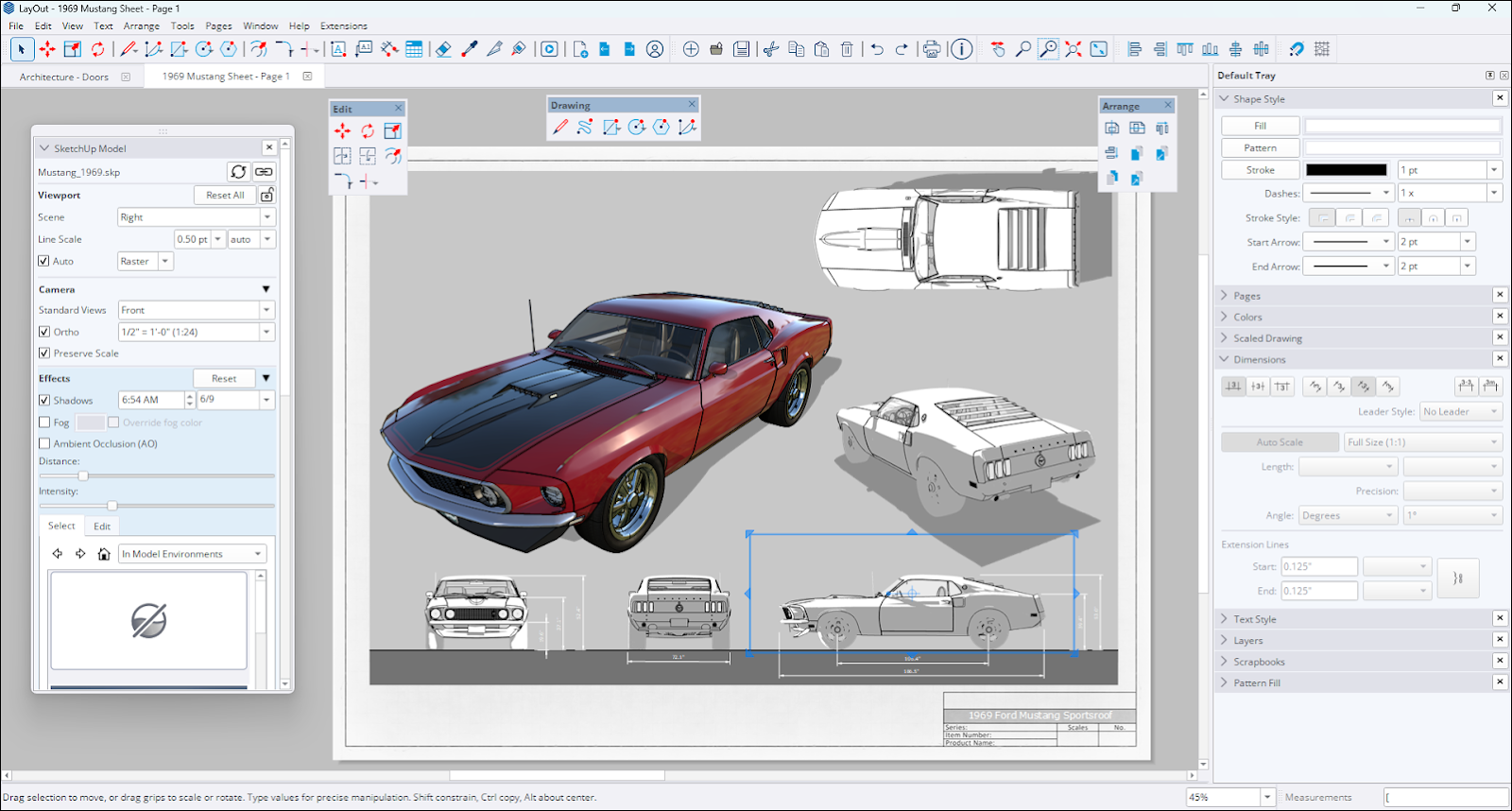
3. LayOut for Professional Documentation
SketchUp Pro includes LayOut, a powerful 2D documentation tool. Designers can create:
-
Construction drawings
-
Floor plans
-
Elevations
-
Scaled presentations
-
Technical documentation
LayOut connects directly to the 3D model, so changes made in SketchUp automatically update in documentation sheets. This reduces errors and increases productivity.
4. 3D Warehouse Integration
SketchUp integrates seamlessly with 3D Warehouse, an extensive online library of pre-built 3D models. Users can download furniture, fixtures, vehicles, trees, and other components to enhance their projects without modeling everything from scratch.
This saves time and improves workflow efficiency.
5. Advanced Visualization & Rendering Support
While SketchUp includes built-in visual styles and shadow tools, it also supports integration with professional rendering plugins such as V-Ray and Enscape. These tools allow designers to create photorealistic renderings for client presentations.
SketchUp 2025 enhances material handling and lighting previews for better visual output directly inside the modeling environment.
6. Interoperability & File Support
SketchUp Pro 2025 supports multiple file formats, including:
-
DWG/DXF
-
IFC
-
OBJ
-
FBX
-
3DS
This ensures compatibility with other industry-standard tools and BIM workflows. Architects can easily collaborate with engineers and consultants using different software platforms.

7. Extension Warehouse
Through the Extension Warehouse, users can install plugins to extend SketchUp’s capabilities. Extensions allow for advanced parametric modeling, structural analysis, animation, and more.
This modular ecosystem makes SketchUp highly customizable based on project needs.
What’s New in SketchUp Pro 2025 (v24.1.3)?
The 2025 update focuses on performance refinement, improved import/export reliability, and enhanced modeling accuracy. Some highlights include:
-
Faster graphics performance
-
Improved DWG compatibility
-
Better material management
-
Enhanced model organization tools
-
Optimized large-model handling
These upgrades make SketchUp more stable and efficient for professional workflows.
Benefits of Using SketchUp Pro 2025
Easy to Learn
SketchUp is beginner-friendly, making it accessible for students and professionals alike.
Fast Concept Development
Designers can quickly convert ideas into 3D models, accelerating early design phases.
Cost-Effective
Compared to many advanced BIM tools, SketchUp Pro offers powerful features at a competitive price.
Flexible & Customizable
With plugins and extensions, users can tailor the software to their specific workflow.
Strong Community Support
SketchUp has a large global community offering tutorials, models, and support resources.
SketchUp Pro vs BIM Software
While full BIM platforms focus heavily on data-rich building models, SketchUp emphasizes flexible 3D modeling and visualization. It is ideal for conceptual design and presentation work. For detailed BIM documentation, SketchUp can integrate with IFC workflows or third-party BIM plugins.
Many architects use SketchUp alongside other tools for concept design, then transition to BIM platforms for detailed documentation.
System Requirements (Typical)
To run SketchUp Pro 2025 smoothly:
-
Windows 10/11 (64-bit) or macOS
-
2+ GHz processor
-
Minimum 8GB RAM (16GB recommended)
-
Dedicated graphics card
-
OpenGL 3.1 or higher support
For complex projects, higher specifications ensure better performance.
Who Should Use SketchUp Pro 2025?
SketchUp Pro is ideal for:
-
Architects
-
Interior designers
-
Landscape designers
-
Construction professionals
-
Furniture designers
-
Urban planners
-
Students and educators
Its versatility makes it suitable for small projects and large-scale developments alike.
Why Upgrade to Version 24.1.3?
Upgrading ensures:
-
Better system compatibility
-
Improved graphics performance
-
More stable modeling environment
-
Enhanced file exchange reliability
-
Access to latest updates and support
Staying current helps professionals maintain workflow efficiency and compatibility with clients and collaborators.
Conclusion
SketchUp Pro 2025 (v24.1.3) continues to deliver a perfect balance between simplicity and professional power. With its intuitive modeling tools, integrated documentation via LayOut, strong plugin ecosystem, and improved performance, it remains one of the most accessible yet capable 3D design solutions available today.
SketchUp Pro 2026 (v24.1.3)Download



