FreeCAD 0.21.3 — A Comprehensive Look at the Open-Source Parametric CAD Powerhouse
FreeCAD 0.21.3 is a release in the popular FreeCAD family of open-source parametric 3D CAD modelers — software designed to enable users to create, edit, and manage 3D models of real-world objects without any licensing costs. Unlike traditional proprietary CAD packages, FreeCAD is free, extensible, highly customizable, and supported by a global community of developers and users. While the precise changes in the 0.21.3 point release are incremental and focused on bug-fixes and stability, it is part of the broader 0.21 series that brought major improvements to the platform’s modeling tools, workbenches, and overall usability.
Originally introduced in August 2023, the 0.21 line was a significant milestone for FreeCAD — delivering new Sketcher enhancements, improvements in technical drawing output, thousands of fixed issues, and expanded simulation capabilities. The 0.21.3 update continues this evolution by polishing the user experience and reliability across different workflows.

What Is FreeCAD?
FreeCAD is a feature-based parametric 3D modeler tailored for CAD, MCAD (Mechanical CAD), CAx, CAE, and PLM tasks. It is especially suitable for mechanical engineering, product design, architecture, and even hobbyist projects such as 3D printing preparation. As an open-source project licensed under LGPL, users can download, use, study, and modify the source code without restrictions.
At its core, FreeCAD uses a parametric modeling approach. This means that every part or assembly is defined by parameters — dimensions and constraints — which can be edited after initial creation. Change a parameter, and the model updates automatically — ideal for iterative design and refinement.
Cross-Platform and Extensible
FreeCAD works on Windows, macOS, and Linux, offering a consistent experience across operating systems. Its modular workbench architecture is one of its defining strengths. Workbenches are specialized toolsets tailored to different tasks — such as part modeling, drafting, simulation, BIM (Building Information Modeling), CAM (Computer-Aided Manufacturing), and more — that load only when needed, keeping the interface focused and efficient.
Additionally, FreeCAD’s integration with the powerful Python scripting language enables automation, tool customization, macro recording, and custom feature development. Advanced users can extend FreeCAD by writing scripts or plugins, adapting the platform to unique workflows and specialized applications.
What’s Included in Version 0.21.3
FreeCAD 0.21.3 is primarily a maintenance release within the 0.21 family, refining previously introduced features and addressing bugs reported by the community. While there isn’t a full changelog that specifically lists every 0.21.3 fix, it generally focuses on:
-
Stability and Bug Fixes — Correction of known issues from earlier 0.21.x builds.
-
Improved Workbench Performance — Polished behavior in frequently used workbenches like Part, Sketcher, and TechDraw.
-
User Interface Enhancements — Incremental UI tweaks for better usability and navigation.
-
Compatibility Fixes — Adjustments to ensure FreeCAD remains compatible with major operating system updates and libraries.
These refinements help make the software more reliable for everyday use, particularly for users working on complex designs.
Although 0.21.3 is a small step in versioning, the broader 0.21 release line was itself significant — bringing enhancements such as an improved Navigation Cube for more intuitive 3D navigation, refined sketcher and grid behaviour, and stronger tools for technical drawing than previous versions offered.
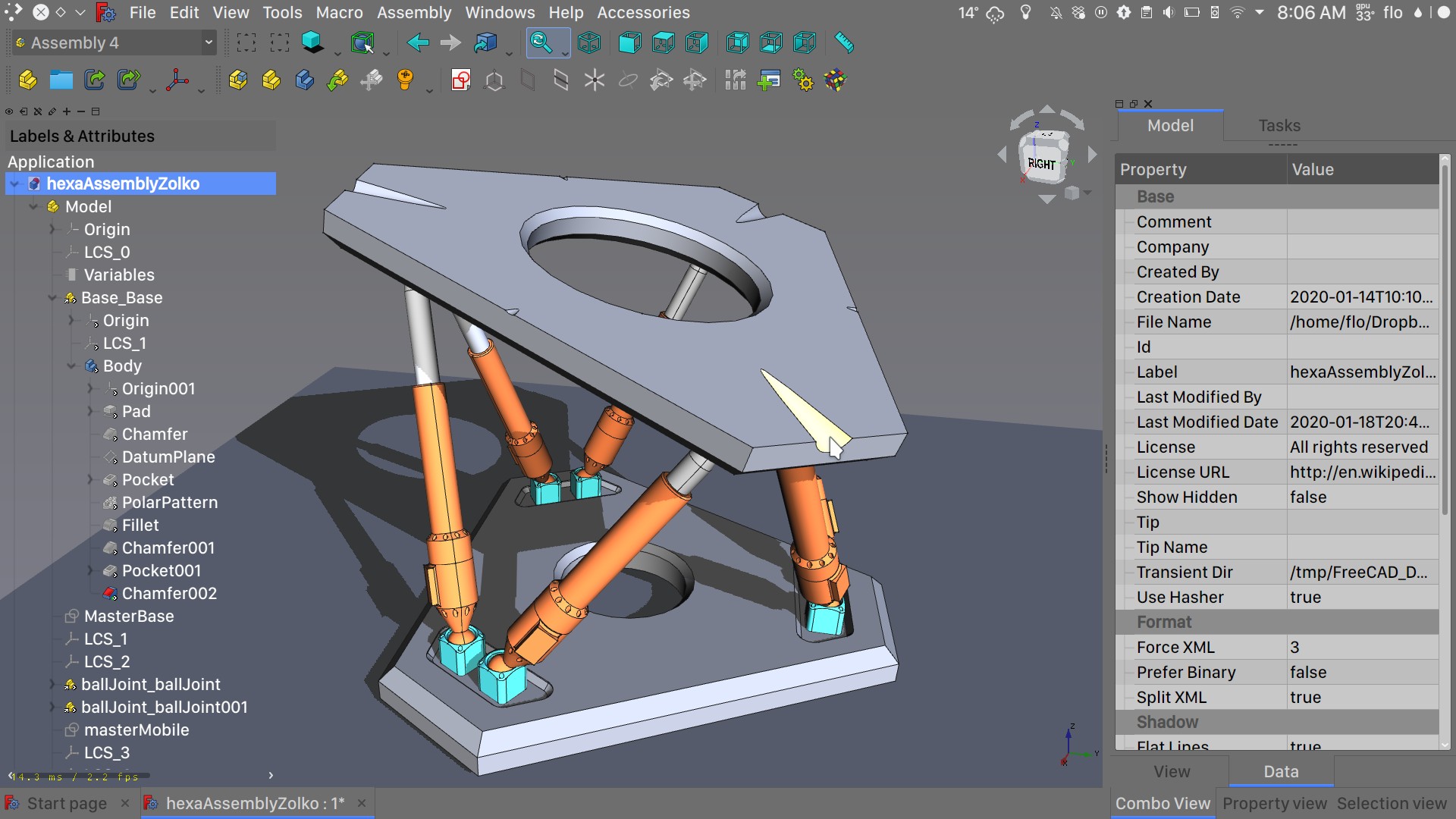
Powerful Workbenches Drive Versatility
FreeCAD’s strength comes from its extensive set of workbenches — modular collections of tools for different design needs:
Part and Part Design Workbenches
These form the core of 3D modeling in FreeCAD. Users sketch 2D contours and use operations like extrude, revolve, sweep, and loft to create 3D solids. Full parametric editing allows you to revisit features and adjust parameters at any time.
Assembly Workbenches
While historically one of FreeCAD’s more challenging areas due to stability issues, ongoing development continues to refine assembly creation and constraints — helping users group parts together into larger, functional systems.
TechDraw Workbench
This tool generates production-ready 2D drawings from 3D models. It supports detailed annotation, section views, and symbols — crucial for manufacturing documentation. This area saw rapid growth and significant new tools in the 0.21 cycle.
FEM Workbench
Finite Element Analysis tools allow structural simulation using solvers like CalculiX and Elmer. In the 0.21 releases, the FEM features were expanded — including magnetodynamic simulations and multi-CPU support for faster processing.
Path Workbench
This module supports CNC toolpath generation and simulation — ideal for preparing parts for machining or fabrication.
File Formats and Interoperability
One of FreeCAD’s major advantages is its ability to import and export a wide range of file formats. These include industry standards such as STEP, IGES, STL, DXF, OBJ, IFC, DAE, and even its own native FCStd format — a zipped XML-based container that retains parametric history. This flexibility enables file exchange with other CAD tools and workflows without vendor lock-in.
Why FreeCAD Matters
1. Open Source and Free
FreeCAD is completely free — no licensing fees, no subscription models, and no limitations on usage or redistribution. This makes it accessible to students, hobbyists, startups, small businesses, and professionals who might not have the budget for commercial CAD software.
2. Professional-Grade Tools
While free, FreeCAD’s capabilities rival many commercial solutions. Its parametric modeling, extensive workbenches, and Python-based customization make it suitable for serious design and engineering tasks, including mechanical systems, architectural models, and even CNC preparation.
3. Community and Extensibility
A global community contributes features, documentation, tutorials, plug-ins, and support. Users can adapt the software to their workflows or even contribute to its development. This collaborative model accelerates innovation and keeps FreeCAD evolving with real-world needs.
Conclusion
Although FreeCAD 0.21.3 may not introduce headline-grabbing new features, it plays an important role in solidifying one of the most capable free and open CAD platforms available today. Anchored by its parametric modeling engine, modular workbenches, cross-platform compatibility, and strong community support, FreeCAD remains a compelling choice for designers, engineers, educators, and makers — offering a professional-grade CAD experience without the price tag.
If you want, I can also explain how to get started with FreeCAD (beginners tutorial) or compare it with other popular CAD tools like Fusion 360 or SolidWorks. Just let me know!