PDF-XChange Editor Plus 10.3.2.389 – Complete Review, Features, Performance, and Use Cases
Introduction
PDF files have become an essential part of modern digital workflows. From contracts and invoices to academic research and official documentation, PDFs are used everywhere because of their consistent formatting and universal compatibility. However, simply viewing PDFs is often not enough. Users need advanced tools to edit, annotate, convert, protect, and manage these files efficiently. This is where PDF-XChange Editor Plus 10.3.2.389 comes into play.
Developed by Tracker Software, PDF-XChange Editor Plus is a professional PDF editing solution known for its powerful features, fast performance, and affordable pricing. Unlike many heavyweight PDF tools, it offers advanced functionality while remaining lightweight and responsive. In this article, we’ll take an in-depth look at PDF-XChange Editor Plus 10.3.2.389, covering its features, performance, advantages, limitations, and ideal use cases.
What Is PDF-XChange Editor Plus?
PDF-XChange Editor Plus 10.3.2.389 is an advanced PDF editing and document management software for Windows. It allows users to create, edit, annotate, convert, secure, and digitally sign PDF documents. The “Plus” edition includes extended features such as PDF creation tools, enhanced OCR, form editing, and advanced document manipulation.
This software is designed for professionals, students, educators, businesses, and anyone who works extensively with PDF files. It serves as a strong alternative to Adobe Acrobat, offering similar capabilities at a more accessible price point.
What’s New in Version 10.3.2.389
Version 10.3.2.389 focuses on performance improvements, bug fixes, and feature refinements. Key updates include:
-
Improved stability when working with large or complex PDFs
-
Faster rendering and scrolling performance
-
Enhanced OCR accuracy for scanned documents
-
Bug fixes related to annotations and form fields
-
Better compatibility with modern Windows systems
These updates make PDF-XChange Editor Plus more reliable and efficient for daily professional use.
User Interface and Ease of Use
PDF-XChange Editor Plus features a ribbon-based interface similar to Microsoft Office. This layout makes it intuitive for new users while still offering deep customization for advanced users.
Customization Options
Users can:
-
Customize toolbars and ribbons
-
Assign keyboard shortcuts
-
Switch between classic and modern UI styles
Despite its wide range of tools, the interface remains organized, ensuring that users can access features quickly without feeling overwhelmed.
Core PDF Editing Features
Text and Image Editing
PDF-XChange Editor Plus allows users to edit PDF content directly. You can:
-
Modify text, fonts, and formatting
-
Resize, move, or replace images
-
Adjust alignment and spacing
Edits are applied precisely, making it ideal for correcting documents, updating reports, or revising contracts.
Object-Level Editing
Advanced users can edit individual objects such as vector graphics, shapes, and paths. This is especially useful for technical documents, diagrams, and design-heavy PDFs.
PDF Creation and Conversion
Create PDFs from Multiple Sources
PDF-XChange Editor Plus can create PDFs from:
-
Microsoft Word, Excel, and PowerPoint files
-
Images and scanned documents
-
Text files and web content
Convert PDFs to Editable Formats
Users can convert PDFs into:
-
Word (DOCX)
-
Excel (XLSX)
-
Image formats (PNG, JPG, TIFF)
The conversion engine preserves formatting accurately in most cases, reducing the need for manual corrections.
OCR (Optical Character Recognition)
OCR is one of the standout features of PDF-XChange Editor Plus 10.3.2.389.
-
Convert scanned PDFs into searchable text
-
Support for multiple languages
-
Batch OCR processing
This feature is invaluable for offices dealing with scanned invoices, books, or archived documents. The improved OCR accuracy in this version ensures better text recognition, even for low-quality scans.
Annotations and Markup Tools
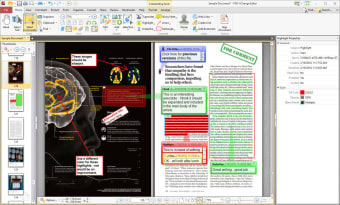
PDF-XChange Editor Plus offers one of the most comprehensive annotation toolsets available.
Annotation Features
-
Highlighting, underlining, and strikethrough
-
Sticky notes and text comments
-
Drawing tools and shapes
-
Stamps and custom annotations
These tools make collaboration easier, especially for students, teachers, editors, and legal professionals.
Forms and Interactive PDFs
Form Creation and Editing
Users can:
-
Create interactive PDF forms
-
Add text fields, checkboxes, radio buttons, and dropdown menus
-
Automatically detect form fields
This makes PDF-XChange Editor Plus suitable for HR departments, educational institutions, and businesses that rely on digital forms.
Digital Signatures and Security
Security is a major concern when working with sensitive documents, and PDF-XChange Editor Plus addresses this well.
Security Features
-
Password protection
-
Certificate-based encryption
-
Redaction tools to remove sensitive data
-
Permission controls (print, copy, edit)
Digital Signatures
Users can digitally sign documents and verify existing signatures, ensuring authenticity and integrity.
Document Management and Organization
PDF-XChange Editor Plus includes powerful document management tools that help users stay organized.
Key Tools
-
Merge and split PDF files
-
Reorder, rotate, or delete pages
-
Add bookmarks and links
-
Insert headers, footers, and watermarks
These features are especially useful for large projects involving multiple PDF files.
Performance and System Resource Usage
One of the strongest advantages of PDF-XChange Editor Plus is its performance.
Performance Highlights
-
Fast startup time
-
Smooth scrolling and zooming
-
Handles large PDFs efficiently
Compared to many competitors, it uses fewer system resources, making it suitable for both high-end and mid-range Windows PCs.
System Requirements
Typical system requirements include:
-
Windows 10 or Windows 11 (64-bit recommended)
-
2 GB RAM minimum (4 GB recommended)
-
Around 1 GB free disk space
These modest requirements make it accessible to a wide range of users.
Pricing and Licensing
PDF-XChange Editor Plus is available under a one-time purchase license, which is a major advantage for users who dislike subscription-based software. There is also a free version with limited functionality and watermarks.
For businesses and organizations, volume licensing options are available, making it cost-effective for teams.
Pros and Cons
Pros
-
Powerful and precise PDF editing
-
Excellent annotation and OCR tools
-
Lightweight and fast
-
One-time purchase pricing
-
Highly customizable interface
Cons
-
Windows-only support
-
Advanced features may require learning time
-
Interface may feel complex for casual users
PDF-XChange Editor Plus vs Adobe Acrobat
When compared to Adobe Acrobat:
-
PDF-XChange Editor Plus is more affordable
-
Uses fewer system resources
-
Offers comparable editing and annotation features
-
Lacks native macOS support
For Windows users, PDF-XChange Editor Plus is a strong and practical alternative.
Who Should Use PDF-XChange Editor Plus 10.3.2.389?
This software is ideal for:
-
Business professionals
-
Students and educators
-
Legal and financial professionals
-
Technical writers and editors
-
Software review and download platforms
If your workflow depends heavily on PDFs, this tool can significantly improve productivity.
Conclusion
PDF-XChange Editor Plus 10.3.2.389 is a feature-rich, efficient, and cost-effective PDF editing solution. With its advanced editing tools, powerful OCR, robust security features, and excellent performance, it meets the needs of both individual users and professional environments.
Its one-time licensing model, combined with lightweight performance, makes it an attractive alternative to subscription-based PDF editors. For Windows users looking for a reliable and powerful PDF solution, PDF-XChange Editor Plus 10.3.2.389 is an excellent choice.
PDF-XChange Printer Lite 10.7.5.403 For Window Download



