AIMP 5.30 Build 2535 – High-Quality Audio Player with Advanced Sound Control
Introduction
In a world dominated by streaming platforms, many users still prefer local music playback for better control, higher audio quality, and offline access. A dedicated audio player remains essential for audiophiles, professionals, and music lovers who value clean sound, customization, and efficiency. Among the top choices in this category, AIMP has consistently stood out as one of the best audio players for Windows.
AIMP 5.30 Build 2535 continues this legacy by offering exceptional sound quality, a lightweight design, advanced audio processing, and extensive format support. Unlike many bloated media players, AIMP focuses purely on audio, delivering a refined listening experience without distractions.
This article provides a comprehensive overview of AIMP 5.30 Build 2535, covering its features, improvements, system requirements, advantages, limitations, and why it remains one of the best music players available today.
What is AIMP?
AIMP is a free, high-performance audio player developed for Windows, with versions also available for Android. It is designed for users who want maximum audio quality, deep customization, and precise control over their music library.
AIMP is well-known for:
-
Crystal-clear sound output
-
Low system resource usage
-
Powerful equalizer and audio effects
-
Support for almost all audio formats
The 5.30 Build 2535 release improves stability, enhances plugin compatibility, and refines the user interface while maintaining the lightweight nature that AIMP users love.
Key Features of AIMP 5.30 Build 2535
1. Superior Audio Quality
AIMP is built around a high-quality audio engine that delivers clean, accurate, and distortion-free sound. It supports:
-
32-bit audio processing
-
High sample rate playback
-
Bit-perfect output (with proper configuration)
This makes AIMP an excellent choice for audiophiles and studio-grade listening.
2. Wide Audio Format Support
AIMP supports a vast range of audio formats without requiring external codecs.
Supported Formats Include:
-
MP3, AAC, WAV, WMA
-
FLAC, ALAC, APE
-
OGG Vorbis, Opus
-
M4A, MP2, AC3, DTS
This extensive compatibility ensures that almost any music file can be played effortlessly.
3. Powerful 18-Band Equalizer and Sound Effects
One of AIMP’s standout features is its advanced audio customization. It includes:
-
18-band graphic equalizer
-
Built-in sound effects
-
Reverb and echo effects
-
Tempo and pitch control
Users can fine-tune audio output according to their headphones, speakers, or personal taste.
4. Lightweight and Resource-Efficient
Despite its advanced features, AIMP is extremely lightweight. It consumes minimal CPU and RAM, making it ideal for:
-
Older PCs
-
Low-power laptops
-
Multitasking environments
The player launches quickly and runs smoothly even with large playlists.
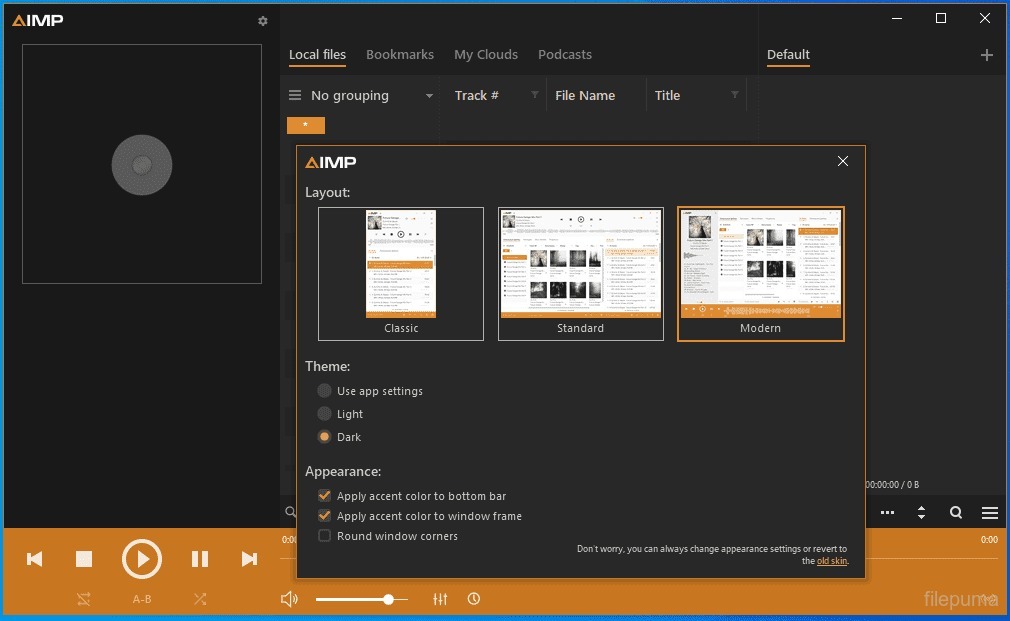
5. Modern and Customizable Interface
AIMP 5.30 Build 2535 features a clean and modern interface that can be heavily customized. Users can:
-
Apply different skins and themes
-
Customize layouts
-
Resize elements
-
Enable compact or full modes
This flexibility allows users to create a listening environment that suits their workflow.
6. Advanced Playlist Management
Managing large music collections is easy with AIMP. Playlist features include:
-
Multiple playlists support
-
Smart playlists
-
Drag-and-drop management
-
Sorting by artist, album, genre, or year
AIMP is especially useful for users with large offline music libraries.
7. Built-In Audio Converter
AIMP includes a built-in audio converter, allowing users to convert music files between formats without third-party tools.
Supported conversion features:
-
MP3 to FLAC
-
WAV to MP3
-
OGG to AAC
-
Batch conversion
This feature is highly valuable for managing storage and compatibility.
8. Audio Tag Editor
AIMP includes a powerful tag editor that allows users to:
-
Edit ID3 and metadata tags
-
Rename files automatically
-
Organize music libraries
-
Add album art
This helps keep music collections clean and well-organized.
9. Plugin Support and Extensibility
AIMP supports plugins, allowing users to extend functionality. Plugins can add:
-
New audio effects
-
Streaming support
-
Visual enhancements
-
Additional tools
This makes AIMP flexible and future-proof.
10. No Ads, No Bloatware
AIMP is completely free and does not include:
-
Advertisements
-
Spyware
-
Bundled software
This clean approach makes it appealing to privacy-focused users.
What’s New in AIMP 5.30 Build 2535?
This version introduces several improvements and fixes, including:
-
Improved stability and performance
-
Enhanced compatibility with Windows 10 and Windows 11
-
Bug fixes in playlist and tag editor
-
Better plugin support
-
Minor UI refinements
These updates ensure a smoother and more reliable experience.
System Requirements
Minimum Requirements
-
Operating System: Windows 7 / 8 / 10 / 11
-
Processor: Intel or AMD (Single-Core)
-
RAM: 1 GB
-
Storage: 100 MB free space
-
Sound Card: DirectSound compatible
Recommended Requirements
-
Processor: Dual-Core CPU or higher
-
RAM: 2 GB or more
-
Audio Device: High-quality DAC or sound card
Advantages of AIMP 5.30 Build 2535
-
Excellent audio quality
-
Extremely lightweight and fast
-
Wide audio format support
-
Advanced equalizer and effects
-
Built-in converter and tag editor
-
Free and ad-free
-
Highly customizable interface
Disadvantages of AIMP 5.30 Build 2535
-
No built-in video playback
-
Interface may feel complex for beginners
-
Limited native streaming features
-
Windows-focused (desktop version)
For users focused on audio, these limitations are usually insignificant.
AIMP vs Other Audio Players
Compared to popular alternatives:
-
AIMP vs Winamp: AIMP offers better performance and modern updates
-
AIMP vs VLC: AIMP provides superior audio control and cleaner interface
-
AIMP vs Foobar2000: AIMP is more user-friendly out of the box
AIMP balances power and usability extremely well.
Who Should Use AIMP?
AIMP is ideal for:
-
Audiophiles and music enthusiasts
-
Users with large offline music libraries
-
People who want ad-free software
-
Users with low-spec PCs
-
Anyone seeking high-quality sound playback
Conclusion
AIMP 5.30 Build 2535 proves that a dedicated audio player can still outperform many modern, bloated applications. With its exceptional sound quality, advanced equalizer, lightweight performance, and powerful music management tools, AIMP remains one of the best audio players available for Windows.
Whether you are a casual listener or a serious audiophile, AIMP delivers a clean, powerful, and enjoyable music experience without cost or compromise. If you are looking for a fast, flexible, and high-quality audio player, AIMP is an outstanding choice.
Media Player Classic HC Latest Version Download 20026



