Vivaldi Browser 6.8.3168.47 – The Ultimate Customizable and Productivity-Focused Web Browser
Modern web users demand more than just speed from their browsers. They expect deep customization, strong privacy controls, efficient multitasking tools, and seamless performance across a wide range of websites. Vivaldi Browser 6.8.3168.47 is designed precisely with these expectations in mind. Built for power users yet accessible to everyday users, Vivaldi offers an unmatched level of control over how the web is experienced.
Developed by the creators behind the original Opera browser, Vivaldi is a Chromium-based browser that combines compatibility with advanced productivity features. Version 6.8.3168.47 refines performance, stability, and usability, making it one of the most feature-rich browsers available today.https://scorpioagersoftware.com/
This article explores Vivaldi Browser 6.8.3168.47 in depth, covering its core features, customization capabilities, privacy tools, performance, and real-world use cases.
1. Overview of Vivaldi Browser
Vivaldi Browser is a modern web browser designed for users who want complete control over their browsing environment. Unlike minimalist browsers that limit customization, Vivaldi embraces flexibility, offering extensive settings that allow users to tailor nearly every aspect of the interface and behavior.
Based on the Chromium engine, Vivaldi supports modern web standards and extensions while adding a unique layer of advanced features not found in typical browsers.
2. What’s New in Version 6.8.3168.47
Vivaldi Browser 6.8.3168.47 focuses on refinement, performance improvements, and bug fixes.
Key enhancements include:
-
Improved stability and responsiveness
-
Performance optimizations for heavy browsing sessions
-
Updated Chromium core for better security
-
UI refinements for smoother interaction
-
Bug fixes across tabs, panels, and settings
These updates ensure a more polished and reliable browsing experience.
3. User Interface and Design Philosophy
3.1 Highly Customizable Interface
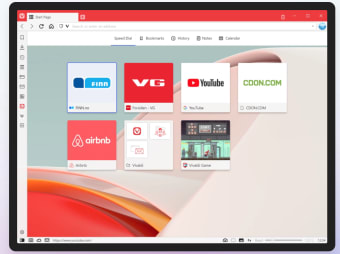
Vivaldi’s interface can be customized in ways few browsers allow. Users can modify tab placement, address bar location, theme colors, and UI density.
3.2 Adaptive Themes
Vivaldi can adapt its theme colors based on the website being viewed, creating a visually immersive experience.
3.3 Keyboard-Driven Navigation
For power users, Vivaldi offers extensive keyboard shortcuts and quick commands to boost productivity.
4. Advanced Tab Management
Tab handling is one of Vivaldi’s strongest features.https://scorpioagersoftware.com/
4.1 Tab Stacking
Users can group related tabs into stacks, keeping the workspace organized.
4.2 Tab Tiling
Multiple tabs can be viewed side by side in a tiled layout, ideal for research and multitasking.
4.3 Vertical and Horizontal Tabs
Vivaldi allows tabs to be placed on any side of the window, depending on user preference.
5. Built-In Productivity Tools
5.1 Notes Manager
Vivaldi includes a built-in notes feature for saving ideas, snippets, and references.
5.2 Screenshot Tool
Users can capture full pages or selected areas directly from the browser.
5.3 Calendar and Mail Integration
Vivaldi integrates email and calendar functionality, reducing reliance on external apps.
6. Privacy and Security Features
6.1 Built-In Ad and Tracker Blocking
Vivaldi includes native ad and tracker blocking, reducing clutter and enhancing privacy.
6.2 Private Browsing
Private windows prevent browsing history and cookies from being saved.
6.3 Secure Chromium Foundation
Vivaldi benefits from Chromium’s sandboxing and security architecture.
7. Performance and Resource Management
7.1 Efficient Resource Usage
Despite its rich feature set, Vivaldi is optimized for efficient CPU and memory usage.
7.2 Smooth Performance
Version 6.8.3168.47 offers smoother scrolling and faster page rendering.
7.3 Handling Heavy Workloads
Vivaldi performs well with many open tabs and complex web applications.
8. Extension Compatibility
8.1 Chrome Web Store Support
Vivaldi supports Chrome extensions, providing access to a massive ecosystem.
8.2 Custom Extension Control
Users can fine-tune extension permissions for better security and performance.
9. Custom Commands and Automation
9.1 Quick Commands
Quick Commands allow users to search tabs, bookmarks, settings, and commands instantly.
9.2 Mouse Gestures
Vivaldi supports customizable mouse gestures for faster navigation.
9.3 Command Chains
Users can create command chains to automate repetitive tasks.
10. Cross-Platform Support
Vivaldi Browser 6.8.3168.47 is available on multiple platforms.
Supported platforms include:
-
Windows
-
macOS
-
Linux
This ensures a consistent experience across devices.
11. Sync and Data Management
11.1 Encrypted Sync
Vivaldi Sync uses end-to-end encryption to protect user data.
11.2 Flexible Sync Options
Users can choose exactly what data to sync across devices.
11.3 Account-Based Sync
Sync is linked to a user account, offering convenience and security.
12. Built-In Search and Address Bar Power
12.1 Smart Address Bar
The address bar functions as a powerful command center for URLs, searches, and bookmarks.
12.2 Custom Search Engines
Users can add and manage multiple search engines easily.
13. Accessibility and Usability
13.1 Custom UI Scaling
Interface elements can be scaled to suit different screen sizes.
13.2 High-Contrast Themes
Themes can be customized for improved readability.
13.3 Keyboard Accessibility
Vivaldi offers excellent keyboard navigation support.
14. Who Should Use Vivaldi Browser 6.8.3168.47?
Power Users
Those who need deep customization and multitasking tools.
Researchers and Writers
Efficient tab management and note-taking tools.
Developers
Advanced control and extension compatibility.
Students
Productivity features for learning and research.
Everyday Users
Users who want a browser that adapts to their workflow.
15. Advantages of Vivaldi Browser 6.8.3168.47
-
Unmatched customization options
-
Advanced tab management
-
Built-in productivity tools
-
Strong privacy controls
-
Chromium compatibility
-
Efficient performance
16. Comparison with Traditional Browsers
Compared to mainstream browsers, Vivaldi offers:
-
More control over UI and behavior
-
Built-in tools that reduce extension reliance
-
Better multitasking capabilities
-
Flexible workflow customization
This makes Vivaldi particularly appealing to advanced users.
17. Limitations to Consider
Despite its strengths, Vivaldi may not be ideal for everyone.
-
Rich feature set may feel overwhelming to new users
-
Initial setup may require time to customize
-
Slightly heavier than minimalist browsers
These are trade-offs for its powerful functionality.
18. Best Practices for Using Vivaldi
-
Customize the interface gradually
-
Use tab stacking and tiling for organization
-
Explore keyboard shortcuts and quick commands
-
Review privacy settings regularly
-
Keep the browser updated
19. The Philosophy Behind Vivaldi
Vivaldi is built on the philosophy of putting users in control. Instead of limiting choices, it empowers users to design their browsing environment based on personal preferences and workflows. This user-centric approach sets it apart in the modern browser landscape.
20. Final Verdict
Vivaldi Browser 6.8.3168.47 is one of the most powerful and customizable web browsers available today. With its advanced tab management, deep customization options, built-in productivity tools, and strong privacy features, it offers a unique browsing experience tailored to individual needs.
For users who want more than a basic browser and value control, efficiency, and flexibility, Vivaldi Browser 6.8.3168.47 is an exceptional choice that transforms browsing into a truly personalized experience.



