Directory Opus 13.2.1 – Advanced File Manager for Power Users and Professionals
Directory Opus 13.2.1 is one of the most powerful and feature-rich file management solutions available for Windows users. Designed for professionals, advanced users, and anyone who demands more control over their files than the default Windows File Explorer provides, Directory Opus combines speed, customization, automation, and advanced file handling into a single, highly flexible application.
With version 13.2.1, Directory Opus continues to refine its performance, stability, and usability while expanding on features that make file management faster, smarter, and more efficient. Whether you manage massive data libraries, work with media files, perform batch operations daily, or simply want total control over your system’s file structure, Directory Opus 13.2.1 delivers a professional-grade experience.
This article explores Directory Opus 13.2.1 in detail, covering its interface, core features, customization options, performance improvements, automation tools, and why it is considered one of the best file managers for Windows.
1. What Is Directory Opus?
Directory Opus is a premium file management software developed as a powerful replacement for Windows File Explorer. Unlike standard file managers, Directory Opus is built with advanced workflows in mind and offers a highly customizable environment.
It allows users to:
-
Browse files faster
-
Manage large directories efficiently
-
Automate repetitive tasks
-
Customize every aspect of the interface
-
Handle archives, metadata, and file previews natively
Directory Opus has been evolving for decades and is trusted by IT professionals, developers, photographers, video editors, and power users worldwide.
2. What’s New in Directory Opus 13.2.1
Directory Opus 13.2.1 is a refinement update focused on stability, performance, and user experience improvements.
Key improvements include:
-
Enhanced overall performance and responsiveness
-
Improved handling of very large folders
-
Reduced memory usage during extended sessions
-
Bug fixes related to file operations and previews
-
Improved compatibility with modern Windows versions
-
Better stability when handling network and cloud drives
These updates make Directory Opus 13.2.1 smoother and more reliable for everyday and professional use.
3. User Interface and Layout Options
One of the defining features of Directory Opus is its fully customizable interface.
3.1 Dual-Pane and Single-Pane Modes
Users can choose between:
-
Single-pane mode for simplicity
-
Dual-pane mode for advanced file operations
Dual-pane browsing allows quick drag-and-drop, side-by-side comparison, and faster file transfers between directories.
3.2 Tabs and Folder Trees
Directory Opus supports:
-
Unlimited folder tabs
-
Independent folder trees
-
Multiple layouts saved as presets
This allows users to switch between workflows instantly.
3.3 Toolbar and Menu Customization
Every toolbar, button, menu, and shortcut can be customized. Users can create custom commands, scripts, and toolbars tailored to their specific needs.
4. File Management Features
Directory Opus excels at handling files with precision and speed.
4.1 Advanced File Operations
It offers powerful tools for:
-
Copying and moving files with queue control
-
Pausing and resuming transfers
-
Verifying file integrity
-
Renaming files in bulk
-
Filtering and sorting by advanced criteria
Batch renaming is particularly powerful, allowing changes based on metadata, numbering, dates, and custom rules.
4.2 Folder Synchronization
Directory Opus includes built-in folder synchronization, making it easy to:
-
Compare folders
-
Detect differences
-
Sync files automatically
This is ideal for backups and mirrored directories.
5. Built-In File Previews
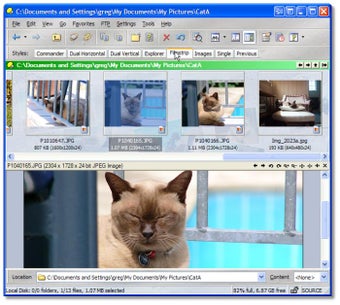
Directory Opus features an advanced preview pane that supports hundreds of file formats.
Users can preview:
-
Images
-
Videos
-
Audio files
-
PDFs
-
Text files
-
Office documents
-
Archives
Previews load instantly without opening external applications, saving time and improving productivity.
6. Metadata and File Properties Management
Managing metadata is simple and efficient in Directory Opus.
6.1 Metadata Editing
Users can edit metadata for:
-
Images (EXIF, IPTC)
-
Audio files (ID3 tags)
-
Video files
-
Documents
Batch metadata editing is supported, which is invaluable for photographers and media professionals.
6.2 File Labels and Ratings
Files can be assigned:
-
Color labels
-
Star ratings
-
Keywords
-
Descriptions
This helps organize large collections and improves search efficiency.
7. Powerful Search and Filtering
Directory Opus offers one of the most advanced search systems available in a file manager.
Search capabilities include:
-
Content-based searching
-
Metadata filtering
-
Regex support
-
Date and size filters
-
Custom queries
Search results update in real time, allowing quick refinement.
8. Automation and Scripting
Automation is where Directory Opus truly stands out.
8.1 Built-In Commands
Hundreds of internal commands allow users to automate common tasks.
8.2 Scripting Support
Directory Opus supports scripting using:
-
JavaScript
-
VBScript
Users can create scripts for advanced automation such as:
-
Automated file sorting
-
Batch processing
-
Custom workflows
-
Scheduled operations
This makes Directory Opus a favorite among power users and IT professionals.
9. Archive and Compression Support
Directory Opus handles archives like normal folders.
Supported formats include:
-
ZIP
-
RAR
-
7Z
-
TAR
-
ISO
Users can browse, extract, and create archives without third-party tools.
10. FTP, Cloud, and Network Support
Directory Opus integrates seamlessly with remote storage.
10.1 FTP and SFTP
Built-in support for secure file transfers allows users to manage remote servers directly from the interface.
10.2 Cloud Storage Integration
Directory Opus works smoothly with cloud services mapped as drives, allowing easy access and management.
11. Performance and Resource Efficiency
Directory Opus 13.2.1 is optimized for speed and stability.
Performance highlights:
-
Fast folder navigation
-
Efficient memory usage
-
Smooth handling of large directories
-
Responsive UI even with thousands of files
It remains stable even during long sessions and intensive file operations.
12. Security and Safety Features
Directory Opus includes features to protect data and avoid mistakes.
-
Confirmation dialogs for critical actions
-
File operation logs
-
Secure deletion options
-
Permission management
These features reduce the risk of accidental data loss.
13. Who Should Use Directory Opus 13.2.1?
Directory Opus is ideal for:
Power Users
Those who want full control over file management.
IT Professionals
System administration, scripting, and automation.
Photographers & Media Creators
Metadata management and previews.
Developers
Advanced file handling and scripting.
Businesses
Efficient organization and file workflows.
14. Advantages of Directory Opus 13.2.1
-
Extremely customizable
-
Powerful automation tools
-
Advanced file previews
-
Robust metadata handling
-
Excellent performance
-
Reliable stability
-
Professional-grade workflows
15. Final Verdict
Directory Opus 13.2.1 is not just a file manager—it is a complete file management platform. It replaces Windows File Explorer with a faster, smarter, and more powerful solution that adapts to the user’s workflow rather than forcing limitations.
With its deep customization, automation capabilities, advanced previews, and superior performance, Directory Opus 13.2.1 is one of the best file management tools available for Windows professionals and power users.
For anyone who works with files extensively and values efficiency, precision, and control, Directory Opus 13.2.1 is an outstanding choice.
Vectr 1.3.2 Free Download For APK for Android 2026
Directory Opus 13.2.1 Free Download For Window 2026



