💎 CPU-Z 2.16 for Windows — The Ultimate Hardware Identification and Monitoring Tool
💡 Introduction
CPU-Z 2.16 for Windows comes in — a lightweight yet incredibly powerful utility that delivers detailed information about your computer’s CPU, motherboard, memory, and system performance.
⚙️ This version, CPU-Z 2.16, continues the tradition of reliability and precision, offering improved hardware detection, enhanced support for the latest processors, and better overall compatibility with Windows 11 and new chipsets.https://scorpioagersoftware.com/
💠 What Is CPU-Z?
CPU-Z is a free diagnostic software tool developed by CPUID, designed to collect and display information about your computer’s main hardware components.
Unlike generic system information utilities, CPU-Z focuses on detailed, technical-level data — making it the preferred choice of professionals for:
-
Overclocking analysis
-
Benchmarking and performance verification
-
System troubleshooting
-
Hardware validation
💎 In short: CPU-Z gives you deep insights into your PC’s hardware that standard Windows tools simply can’t.
⚙️ Core Features of CPU-Z 2.16
This latest release brings improved performance, better hardware recognition, and modern compatibility updates. Let’s explore the key features that make CPU-Z 2.16 an essential tool for any PC enthusiast.
✦ 1. Comprehensive CPU Identification
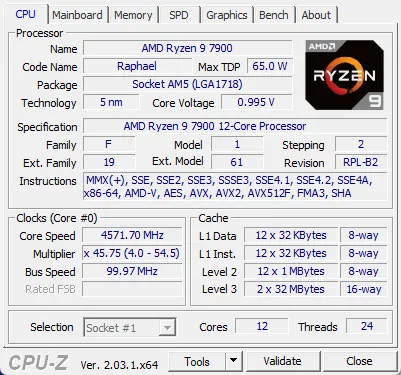
The main attraction of CPU-Z is, of course, its detailed CPU analysis module.
It provides instant, accurate information about your processor, including:
-
Processor name and code name
-
Core architecture and technology
-
Clock speeds (core and bus)
-
Core voltage and multiplier
-
Cache levels (L1, L2, L3)
-
Supported instruction sets (SSE, AVX, etc.)
💡 Whether you have an Intel Core i9, AMD Ryzen 9000 series, or Threadripper, CPU-Z identifies it with unmatched accuracy.
✦ 2. Real-Time Clock Speed Monitoring
CPU-Z doesn’t just identify hardware — it also monitors real-time clock frequencies.
You can see live updates of:
-
CPU core speeds
-
Multiplier changes
-
Bus speed variations
This is especially valuable for overclockers and performance testers who need to monitor CPU behavior under stress or during gaming.
✦ 3. Motherboard Information
CPU-Z 2.16 gives full visibility into your motherboard’s configuration:
-
Manufacturer & model
-
Chipset type and revision
-
BIOS version and release date
-
PCI-Express and link speed details https://scorpioagersoftware.com/
⚙️ This data helps users confirm BIOS updates, chipset compatibility, and expansion slot functionality.
✦ 4. Memory (RAM) Details
Memory configuration is another key strength of CPU-Z.
It identifies your system’s RAM type and performance metrics, including:
-
Memory type (DDR3, DDR4, DDR5)
-
Size, frequency, and channel count
-
Timings (CAS Latency, RAS to CAS, RAS Precharge)
-
Manufacturer and SPD serial number
💠 The SPD (Serial Presence Detect) tab provides a per-slot breakdown of each memory module — making it easy to detect mismatched or failing sticks.
✦ 5. GPU (Graphics) Detection
CPU-Z includes a Graphics tab that provides:
-
GPU name and vendor (NVIDIA, AMD, Intel)
-
Core and memory clock speeds
-
Driver version
-
GPU revision and process node
🎮 This makes it perfect for gamers and content creators who want to confirm their GPU specifications before updating drivers or running performance tests.
✦ 6. Benchmarking & Performance Testing
The built-in CPU-Z Benchmark module allows you to measure your processor’s single-thread and multi-thread performance.
You can:https://scorpioagersoftware.com/
-
Compare scores with other CPUs
-
Validate online through the CPUID Benchmark Database
-
Save and share results for bragging rights or professional testing
⚡ The benchmark is lightweight yet accurate — ideal for comparing hardware or verifying overclocking gains.
✦ 7. Hardware Validation
CPU-Z includes a Validation Tool, which generates a unique hardware ID for your system.
You can upload this to the CPU-Z Validation Database, verifying your hardware configuration publicly.
💎 Overclockers and PC reviewers use this feature to authenticate world-record benchmarks or showcase custom-built systems.
✦ 8. Portable and Lightweight Design
CPU-Z is completely portable — meaning no installation required.
Just download, extract, and run it.https://scorpioagersoftware.com/
✅ No registry changes
✅ No background services
✅ No bloatware
Its compact size (under 5 MB) makes it perfect for technicians who want to carry it on a USB drive for quick diagnostics.
✦ 9. Support for Latest Hardware
CPU-Z 2.16 introduces enhanced support for the latest hardware, including:https://scorpioagersoftware.com/
-
Intel Core Ultra (Lunar Lake) and 14th Gen (Raptor Lake Refresh) CPUs
-
AMD Ryzen 9000 Series (Zen 5 architecture)
-
DDR5 and LPDDR5X memory
-
New NVIDIA RTX 5000 series GPUs
-
Updated motherboard chipsets (Z890, X870)
💠 This ensures compatibility across all modern systems, from laptops to high-end gaming rigs.
✦ 10. Detailed Sensor Monitoring
CPU-Z now integrates improved voltage and temperature sensor detection.
While not as detailed as full monitoring tools like HWMonitor, it provides quick, real-time insights into:
-
CPU temperature
-
Core voltage
-
Power usage trends
⚙️ A valuable addition for enthusiasts looking to maintain performance within safe limits.
💽 What’s New in CPU-Z 2.16
The 2.16 release refines the already powerful capabilities of CPU-Z, with these improvements:
✦ Enhanced detection for new Intel and AMD processors
✦ Updated memory timing recognition for DDR5/LPDDR5
✦ Improved Windows 11 24H2 compatibility
✦ Fixed bugs with GPU information display
✦ Optimized benchmark scoring for hybrid architectures
✦ Updated CPUID validation protocol for stronger accuracy
💠 Result: Smoother performance, wider compatibility, and more precise hardware identification.
🧠 Why CPU-Z Is Essential for Every PC User
Whether you’re a casual computer user or a hardcore hardware enthusiast, CPU-Z 2.16 has something to offer.
Here’s why millions of users trust it every day:
✅ Instant Hardware Details — Know exactly what’s inside your PC.
✅ Safe and Lightweight — No installation or ads.
✅ Benchmark Ready — Measure performance instantly.
✅ Validation Tool — Share and verify results online.
✅ Totally Free — 100% free for personal and professional use.https://scorpioagersoftware.com/
🧩 User Interface Overview
The CPU-Z interface is simple and effective, divided into clearly labeled tabs:https://scorpioagersoftware.com/
-
CPU — Processor details and frequency
-
Caches — Cache hierarchy and memory size
-
Mainboard — Motherboard and BIOS info
-
Memory — Real-time RAM specifications
-
SPD — Per-slot RAM module details
-
Graphics — GPU info and driver data
-
Bench — Benchmark & stress testing
⚙️ Every tab loads instantly, with zero lag — even on low-end systems.
🧮 System Requirements
| Component | Minimum Requirement |
|---|---|
| 💻 Operating System | Windows 7, 8, 10, 11 (32-bit / 64-bit) |
| 🧠 CPU | Any x86 / x64 processor |
| 💾 RAM | 512 MB minimum |
| 📦 Storage Space | ~5 MB |
| 🌐 Internet (Optional) | Required for validation uploads |
💾 Installation and Usage
CPU-Z 2.16 can be used in two forms:
🧩 1. Portable Version
-
Download the ZIP file
-
Extract it to a folder or USB drive
-
Run cpuz.exe directly
⚙️ 2. Installer Version
-
Download and run the setup file
-
Follow on-screen steps
-
Launch CPU-Z from Start Menu or Desktop
💠 Either way, it launches instantly and consumes minimal system resources.
🔍 Practical Use Cases
⚙️ 1. System Diagnostics
Troubleshoot unknown hardware, missing drivers, or incorrect BIOS configurations.
🎮 2. Overclocking
Monitor CPU frequency, voltage, and multiplier stability during overclocking sessions.
🧰 3. Benchmarking
Compare single-core and multi-core performance against other CPUs.
🧩 4. Compatibility Verification
Ensure your RAM or GPU matches motherboard specifications before upgrades.
💾 5. Validation
Share verified hardware specs with online communities, PC reviewers, or clients.
🧠 Tips for Using CPU-Z Effectively
✔️ Run CPU-Z as Administrator for full hardware detection.
✔️ Use the Bench tab before and after upgrades to measure performance gains.
✔️ Always validate online to ensure authentic results.https://scorpioagersoftware.com/
✔️ Pair CPU-Z with GPU-Z and HWMonitor for a complete system diagnostic toolkit.
✔️ Save your report as a TXT or HTML file for documentation or troubleshooting.
🧰 Comparison: CPU-Z vs Other Tools
| Feature | CPU-Z 2.16 | HWInfo | Speccy |
|---|---|---|---|
| CPU Identification | ✅ Accurate | ✅ Accurate | ⚙️ Basic |
| Benchmarking | ✅ Built-in | ❌ | ❌ |
| Portable Version | ✅ | ✅ | ✅ |
| Real-Time Clock Speeds | ✅ | ✅ | ⚙️ Limited |
| Validation Service | ✅ | ❌ | ❌ |
| Size | ⚡ <5 MB | 🧩 ~10 MB | ⚙️ ~8 MB |
💡 Verdict: CPU-Z is the perfect balance between depth, simplicity, and portability.https://scorpioagersoftware.com/
💬 User Feedback
⭐ “CPU-Z has been my go-to tool for overclocking and system analysis. Fast, accurate, and free.”
— Mark J., Hardware Reviewer
⭐ “I use it in every PC build. It tells me exactly what components are installed.”
— Linda P., Technician
⭐ “The validation system is a great way to share performance results online.”
— Alex R., Gamer
🧾 Advantages and Limitations
✅ Pros
-
⚙️ Lightweight and fast
-
💾 Portable and installation-free
-
🧩 Accurate CPU and RAM details
-
💠 Built-in benchmark and validation
-
🔒 Safe, trusted, and ad-free
⚠️ Cons
-
❌ No GPU stress testing
-
❌ Limited temperature data
-
❌ Interface is functional, not fancy
🧩 Use Cases for Professionals
| User Type | Benefit |
|---|---|
| 🧑💻 System Builders | Verify hardware compatibility |
| 🎮 Gamers | Benchmark performance before upgrades |
| 🧰 Technicians | Diagnose hardware faults |
| 🧠 Overclockers | Track CPU speed and stability |
| 🏢 IT Managers | Generate system reports |
⚡ Performance Benchmark Insights
CPU-Z’s benchmark engine allows you to test performance instantly and compare scores.
For example:
-
Intel i9-14900K: ~900 (single thread), ~14,000 (multi-thread)
-
AMD Ryzen 9 9950X: ~880 (single thread), ~16,500 (multi-thread)
💡 Such comparisons help you evaluate CPU efficiency, overclock success, or detect throttling issues.
🧭 Why CPU-Z 2.16 Stands Out
✅ Accurate — unmatched hardware detection
✅ Fast — instant startup and response
✅ Portable — no installation needed
✅ Free — no hidden costs or ads
✅ Up-to-date — supports newest CPUs and GPUs
💠 Whether you’re building a new PC, troubleshooting, or benchmarking, CPU-Z 2.16 is your ultimate companion.
🏁 Final Verdict
CPU-Z 2.16 for Windows remains the gold standard in system information tools.
It’s simple yet powerful, lightweight yet incredibly detailed — a perfect utility for anyone who values hardware transparency.
From gamers and overclockers to technicians and casual users, CPU-Z continues to deliver unmatched accuracy and ease of use.https://scorpioagersoftware.com/
💎 If you want to truly understand your PC’s inner workings — CPU-Z 2.16 is the tool you need.
🌟 Overall Rating
| Category | Score |
|---|---|
| 🧩 Accuracy | ⭐⭐⭐⭐⭐ |
| ⚙️ Performance | ⭐⭐⭐⭐⭐ |
| 💾 Lightweight Design | ⭐⭐⭐⭐⭐ |
| 🔒 Safety | ⭐⭐⭐⭐⭐ |
| 🎨 User Interface | ⭐⭐⭐⭐✦ |
✅ Final Verdict: CPU-Z 2.16 remains the most efficient, reliable, and essential system diagnostic tool for Windows users in 2025.
📊 Schema Markup (for SEO-rich snippets)
(You can add this through plugins like RankMath or Schema Pro)
Type: SoftwareApplication
Name: CPU-Z 2.16
OperatingSystem: Windows 7 / 8 / 10 / 11
ApplicationCategory: Utility
Publisher: CPUID
SoftwareVersion: 2.16
Price: Free
🔚 Conclusion
CPU-Z 2.16 isn’t just a utility — it’s an industry standard for hardware identification and performance analysis.
Its ability to accurately display detailed information about CPUs, GPUs, memory, and motherboards makes it indispensable for professionals and enthusiasts alike.
⚙️ Understand. Optimize. Validate. https://scorpioagersoftware.com/
That’s the power of CPU-Z 2.16 for Windows — the simplest way to uncover your computer’s true potential.



