VintaSoft Imaging .NET SDK is one such comprehensive solution. It provides a broad set of capabilities around image loading, saving, rendering, processing, annotation, format conversion, capturing from cameras or scanners, and more. The SDK is extensible via plug-ins for PDF, OCR, forms (OMR), document cleanup, DICOM, and other specialized domains.
Version 14.1.x of the SDK (e.g. 14.1.14.1) is one of the more recent public versions, and it includes new features and improvements introduced in the 14.1 release. The 14.1 release announcement describes key additions like enhanced PDF editing in browser, new format converters (DOCX → HTML, ODT → DOCX, etc.), new decoders/encoders (SVG, PSD), ink annotations, OMR template recognition, and more. vintasoft.com
In this article, we’ll explore:
-
An overview of VintaSoft Imaging .NET SDK
-
Architecture & internal design
-
Core features and new features in v14.1
-
Extensibility via plug-ins
-
Use cases & scenarios
-
Strengths, limitations & risks
-
Comparisons with alternatives
-
Best practices & tips for developers
-
Possible roadmap / future directions
-
Conclusion
1. What Is VintaSoft Imaging .NET SDK?
At its core, VintaSoft Imaging .NET SDK is a .NET library / SDK designed to provide robust image and document processing capabilities to .NET applications (desktop, web, service). It is cross-platform in that it supports .NET on Windows, Linux, and macOS (to the extent supported) for non-UI core functions, while UI controls (viewers, rendering) are tailored to Windows/WinForms/WPF and web contexts.
The SDK is built in managed C# and is distributed with support for AnyCPU, x86, and x64 modes. It includes capabilities to:
-
Load, save, and convert images in many formats
-
Render images and image regions
-
Capture images from DirectShow-compatible cameras
-
Process images (filtering, transformations, cleanup, etc.)
-
Read, edit, and write metadata (EXIF, IPTC, etc.)
-
Provide viewing controls (WinForms, WPF, Web/HTML5)
-
Handle large/multipage images (TIFF, multipage TIFF)
-
Work with color management
-
Work with low-level file structures (e.g. manipulate TIFF tags, strips, etc.)
Thus, it is a full suite for building imaging and document-centric applications in .NET.
Because image and document processing domains often require specialized support (OCR, PDF, forms recognition, medical DICOM, etc.), VintaSoft offers plug-ins that extend the core SDK with those features.
2. Architecture & Internal Design
Understanding the architecture helps developers know how to use it efficiently and what constraints exist. Based on public documentation, one can infer the following architecture and design principles.
2.1 Modular Core + Plug-ins
The SDK uses a core engine and optional plug-ins. The core SDK handles the base functionality of image loading, rendering, processing, metadata, etc. Plug-ins add domain-specific features like OCR, PDF editing, form recognition, advanced codecs (JPEG2000, JBIG2), DICOM, document cleanup, etc. https://scorpioagersoftware.com/
This modular design means that you don’t pay (or load) features you don’t need, and applications can be leaner by including only required plug-ins.
2.2 Managed .NET & Cross-Platform Core
The core components are written in managed .NET (C#). This allows portability within .NET runtimes, and easier integration with .NET applications.https://scorpioagersoftware.com/
While UI/viewer controls are platform-specific (e.g. WinForms, WPF, ASP.NET), many of the core processing, decoding, encoding, conversion logic can operate independently of UI context.
2.3 Codecs / Decoders / Encoders & Extensible Architecture
One of the SDK’s strengths is its open codec architecture: you can add, remove, reorder codecs, or plug in custom decoders/encoders.
For example:
-
The SDK supports many image formats by default, but advanced or niche formats (JPEG2000, JBIG2, PSD, SVG) are often provided via plug-ins or added decoders.
-
The architecture allows low-level manipulation of internal file structures — e.g. TIFF pages, tags, strips, without full re-encoding of the image data. https://scorpioagersoftware.com/
This design gives developers fine-grained control over efficiency and format handling.
2.4 Rendering, Tiling, Progressive Loading
To efficiently view large images (or multipage documents), the SDK supports:
-
Progressive / tiled rendering: rendering only visible regions or incremental rendering.
-
Asynchronous rendering: operations occur off the UI thread with progress callbacks.
-
Thumbnail rendering: multithreaded thumbnail generation in background
These help ensure responsiveness and scalability in UI applications.
2.5 Image Processing Pipeline
The SDK includes 110+ processing commands (filters, transforms, cleanup) and allows creation of custom commands. https://scorpioagersoftware.com/
Image operations (resize, rotate, crop, deskew, despeckle, brightness/contrast, binarization, color transforms, filtering) are typically applied via a pipeline model, where you can chain transformations in memory before rendering or saving.
2.6 Metadata & Color Management
The SDK doesn’t treat images purely as pixel matrices — it also supports metadata handling (EXIF, IPTC) and color management (ICC profiles, color space conversions). https://scorpioagersoftware.com/
This is essential for professional imaging workflows where color fidelity and metadata preservation matter.
2.7 Low-Level File Manipulation
One advanced feature is the ability to manipulate file formats at a low level without re-encoding, which preserves fidelity and is more efficient:
-
For TIFF: add, remove, reorder pages; manage tags; insert strips/tiles; copy pages across files without re-encoding.
-
For GIF: manage frames, metadata, optimize/deoptimize animation.
-
For ICO/CUR: manage frames, hotspots.
This is particularly useful for large multipage TIFF files or large images, avoiding unnecessary re-encoding overhead.
3. Core Features & New Additions in v14.1
Version 14.1 brings enhancements, new features, and bug fixes over prior versions. Below is a detailed look at its features, including what’s newly added in 14.1. vintasoft.com+2vintasoft.com+2
3.1 Core Features (pre-existing)
These are the foundational features offered by the SDK (and present before 14.1):
-
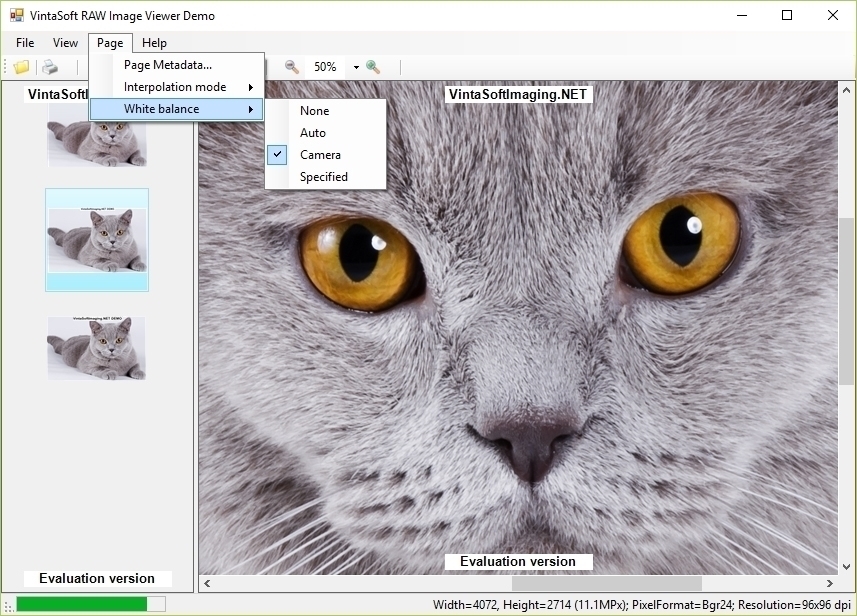
Image loading & saving: support for many formats (BMP, GIF, PNG, TIFF, JPEG, multipage TIFF, RAW, ICO/CUR, EMF, WMF, etc.)
-
Multi-page support: for TIFF, multipage files.
-
Image rendering & viewing controls: WinForms, WPF, Web (HTML5) viewers with zoom,
-
Image processing algorithms: large library of built-in filters and transformations.
-
Low-level file structure manipulation: as explained earlier.
-
Camera / capture support: capture images from DirectShow-compatible cameras.
-
Demo applications and example projects: to guide developers in different contexts (WinForms, WPF, ASP.NET, console, etc.) https://scorpioagersoftware.com/
3.2 New Features & Enhancements in 14.1
Version 14.1 adds several notable features and improvements:
-
Web PDF Text Editing Control (JavaScript UI)
A control for editing PDF text content in a browser (via JS). Allowed actions:-
Split text into blocks
-
Add, delete, copy/paste text blocks
-
Change text content
-
Set style: font, size, bold/italic, underline/strikethrough, alignment, color
-
Undo/redo changes
https://scorpioagersoftware.com/
-
-
Document Format Conversion Enhancements
New conversions:-
DOCX → HTML
-
ODT → DOCX
-
ODS → XLSX
And improved converters from HTML → DOCX and RTF → DOCX
-
-
New Decoders & Encoders
-
SVG decoder
-
PSD (Photoshop) decoder & encoder vintasoft.com
-
-
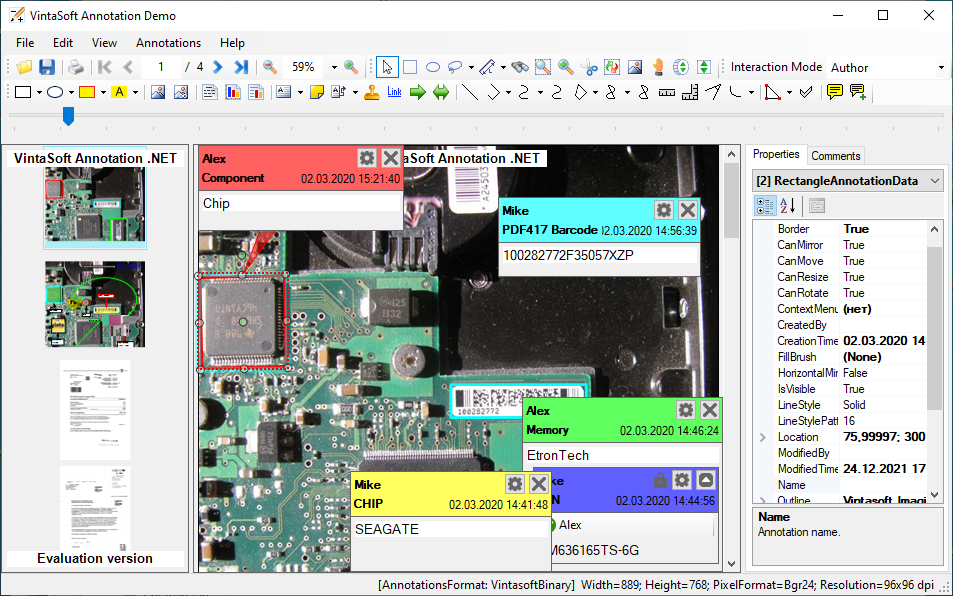
Ink Annotations
Add hand-drawn line annotations on images or PDF pages, plus ability to erase parts or points of annotations. Also support for annotating JPEG2000 images. vintasoft.com -
OMR / Template Recognition for Forms
Ability to detect templates of OMR (optical mark recognition) in document forms, making template creation easier and faster. vintasoft.com -
Bug Fixes, Font Parser Improvements
In version 14.1, minor bug fixes, e.g. in font parsers, were addressed. vintasoft.com+1
So, version 14.1 is not just incremental: it brings new capabilities around document formats, web-based editing, more image formats, and annotation tools, enhancing the SDK’s scope beyond pure imaging to document manipulation.
4. Extensibility via Plug-ins & Modules
A critical aspect of VintaSoft Imaging .NET SDK is its plug-in architecture. The SDK’s power comes not just from core imaging, but from the optional modules that enable domain-specific capabilities. Here are some of them:
| Plug-in / Module | Purpose / Features |
|---|---|
| Annotation .NET Plug-in | Allow adding, editing, drawing annotations on images or PDF documents (shapes, lines, text). |
| PDF .NET Plug-in | Load, view, edit, convert, optimize PDF documents; manipulate PDF pages, overlays, text, etc. |
| PDF Visual Editor | In-browser or UI control for visual editing of PDF documents (text, objects). |
| JBIG2 .NET Plug-in | Support decoding and encoding of JBIG2 image format. |
| JPEG2000 .NET Plug-in | Support decoding/encoding JPEG2000 images. |
| DICOM Decoder .NET Plug-in | Support for DICOM medical imaging format decoding and viewing. |
| Document Cleanup .NET Plug-in | Tools for cleaning up scanned document images (removing lines, noise, hole punches, artifacts, etc.). |
| OCR .NET Plug-in | Recognize text from scanned images or image-based PDF, make searchable output. |
| Forms (OMR) Processing .NET Plug-in | Recognize OMR marks, read form fields, process structured documents. |
| Office .NET Plug-in | Open, view, convert, and interact with Office documents (DOCX, XLSX etc.). |
| Other specialized plug-ins | Potential support for additional formats, specialized tools, etc. |
You can choose which plug-ins to include in your application, keeping it as lean as possible while still supporting necessary functions.
The plug-in architecture interacts with the core SDK so that, for example, when a PDF file is loaded, the PDF plug-in hooks into decoding, allows rendering, and extends editing capabilities. Similarly, OCR and forms plug-ins work in cooperation with captured or loaded image content.
This modular design is a major strength, as it allows customization and scalability of the overall system.
5. Use Cases & Application Scenarios
VintaSoft Imaging .NET SDK is used in many real-world scenarios. Here are some typical use cases and application types:
5.1 Document Scanning & Imaging Applications
-
Scan-to-Archive systems: capturing documents from scanners (or camera), cleaning up images, converting to PDF, OCR, storing in DMS (Document Management Systems).
-
Digital library / archival: handling large volume of documents (multi-page TIFF/PDF), indexing, search, display.
-
Document viewers: building custom viewers (desktop or web) which require zoom, pan, annotation, search, etc.
5.2 Medical / Healthcare Imaging
-
DICOM image viewing: medical imaging in hospitals, radiology, PACS systems (using DICOM plug-in).
-
Conversion and processing: converting between medical image formats or combining image processing (filtering, enhancement) before display.
5.3 Forms / OMR / Survey Applications
-
Forms processing: applications that read filled forms (OMR), questionnaires, surveys, test sheets.
-
Template recognition: dynamic template generation and recognition (supported in v14.1).
5.4 Document & Report Generation / PDF Systems
-
PDF editing in web: embedding browser-based PDF editing (text changes) using WebPdfDocumentEditorControlJS introduced in v14.1.
-
Document conversion: converting between DOCX, HTML, ODT, RTF formats—useful for content management, report engines, etc.
5.5 Imaging Tools, Photo / Graphic Applications
-
Image editors: image cropping, filtering, overlay, annotation tools.
-
Photo management / galleries: image viewer with thumbnails, preview, metadata editing.
5.6 Analysis / Automation / Backend Processing
-
Batch image processing: applying filters, cleanup, format conversion in background or service.
-
OCR & extraction: converting scanned document images to searchable content.
-
Integration into workflows: e.g. incoming scanned documents processed, converted, stored, indexed.
5.7 Web / Cloud-Based Imaging
-
Web viewers & editors: server-side rendering and client-side display (HTML5), enabling imaging in web apps.
-
Web APIs / services: use the core library in web backends to process images and return results to clients.
Because the SDK supports .NET Core / .NET 6/7 and frameworks, web and cross-platform services are feasible. https://scorpioagersoftware.com/
6. Strengths, Limitations & Risks
No SDK is perfect. Here is a critical assessment of VintaSoft Imaging .NET SDK (especially around v14.1 / 14.1.x).
Strengths (What It’s Good At)
-
Comprehensive feature set
It covers a wide range of image and document capabilities (loading, saving, rendering, processing, annotation, conversion). -
Modular / plug-in architecture
You can include only what you need, keeping the footprint optimized. -
Low-level control & file structure access
Ability to manipulate TIFF pages, tags, strips without full re-encode is a major advantage when handling large documents. -
Cross-platform core + managed .NET
Allows many core functions to run in non-Windows environments (e.g. .NET in Linux/macOS) where UI elements are not required. -
New capabilities in v14.1
The additions (SVG/PSD, web-based PDF editing, ink annotation, OMR) expand the SDK into new domains. -
Strong support & example applications
The SDK ships with demos for multiple platforms (WPF, WinForms, Web, console) which accelerate developer onboarding. vintasoft.com+1 -
Scalability & performance
Progressive rendering, asynchronous operations, multithreaded thumbnails help in real-world large data use.
Limitations & Risks (What to Watch Out For)
-
Licensing Costs / Complexity
As a commercial SDK with plug-ins, licensing fees may be significant, especially when many plug-ins are required. -
Memory Usage / Scalability for Huge Documents
While efficient, fully in-memory operations on extremely large scans or multipage documents may hit memory limits. -
Platform / UI Dependence
UI rendering and viewer controls are tightly tied to Windows/WPF/WinForms; cross-platform UI use is more limited. -
Complexity & Learning Curve
Because of its breadth, mastering the SDK, its plug-ins, and correct pipeline usage takes time. -
Third-Party Dependencies & Interoperability
Handling specialized formats (e.g. DICOM, PDF, Office formats) depends on plug-ins’ correctness and version compatibility. -
Edge Cases in Conversion / Parsing
Highly non-standard or corrupted files may not convert cleanly; certain format quirks may need manual handling. -
Performance Tuning Required
In UI applications, unoptimized use (e.g. rendering full pages in UI thread) may cause slowdowns; developers must design carefully. -
Version Upgrades & Compatibility
Upgrading between minor versions (e.g. from 14.0 to 14.1) may require adjustments in existing code or new behaviors, especially for converters or plug-ins. -
Memory Leaks / Resource Disposal Responsibility
As with any large imaging library, careful disposal of image objects, streams, and watchers is essential to avoid leaks.
7. Comparison with Alternatives
There are several competing libraries, SDKs, or solutions for image/document processing in .NET. Here’s how VintaSoft Imaging .NET stacks up.
| Alternative / Library | Strengths | Weaknesses Compared to VintaSoft | Where VintaSoft Has Edge |
|---|---|---|---|
| ImageMagick / Magick.NET | Very powerful, open-source, supports many formats | Primarily pixel-level processing, less UI/viewer support, less high-level document features | VintaSoft offers built-in viewers, annotation, metadata control, and plug-ins for PDFs/office |
| Aspose.Imaging / Aspose.PDF / Aspose.Total | Enterprise-level support, PDF + imaging combined | Expensive, possibly heavier dependencies, licensing | VintaSoft’s modular design may allow leaner builds, and lower-level control in some imaging scenarios |
| Leadtools Imaging SDK | Long-standing imaging toolkit, many features | Licenses may be costly, steeper learning | VintaSoft’s newer features (web PDF editing, OMR template support) are differentiators |
| SkiaSharp / SixLabors.ImageSharp | Open-source, high performance for basic image ops | Less ready support for multi-page, document, annotation, OCR, PDF, etc. | VintaSoft covers multi-page TIFF, PDF, document-centric features more robustly |
| OpenCV / EmguCV (.NET wrapper) | Powerful image processing, especially for computer vision | More focused on algorithms than document workflows or viewer UI | VintaSoft combines imaging + document + UI + conversion in one suite |
In summary, VintaSoft’s strength is in being a more complete “imaging + document + UI + plug-in” solution, rather than just a raw image processing library.
8. Best Practices & Tips for Developers (Using v14.1 / 14.1.x)
To get the most out of VintaSoft Imaging .NET SDK (especially version 14.1 / 14.1.14.1), here are recommended practices and tips:
a) Start with Demos & Examples
-
Begin by building and running the demo applications provided (WPF, WinForms, Web) to understand architectural patterns and sample code. vintasoft.com+1
-
Use the demo projects as templates or references for your own application.
b) Modular Design: Include Only Needed Plug-ins
-
Don’t load every plug-in by default; include only those you need (e.g. if your app needs OCR and PDF but not DICOM).
-
This keeps the deployment lighter and reduces potential conflicts.
c) Use Asynchronous / Progressive Rendering
-
For UI responsiveness, avoid heavy image operations on the UI thread. Use asynchronous rendering and tile-based rendering.
-
Use progress callbacks and cancellation support where possible.
d) Dispose Resources Carefully
-
Always dispose image objects, streams, viewer controls, and watchers to avoid memory leaks.
-
Use
usingblocks or explicit disposal patterns.
e) Batch / Streaming for Large Documents
-
For very large multipage TIFFs or PDF conversions, consider streaming or chunk-based processing rather than loading entire data in memory at once.
-
If you anticipate memory constraints, design with lower memory footprints (load page-by-page).
f) Handle Conversion Edge Cases
-
For format conversion (e.g. DOCX → HTML, etc.), test many real-world documents to catch quirks (styles, fonts, embedded objects).
-
Provide fallback or error-handling paths for documents that cannot fully convert.
g) Use Caching / Thumbnail Previews
-
In viewer UI, maintain thumbnail caches or precomputed previews to reduce repeated full rendering.
-
Use multi-threaded thumbnail generation to keep UI responsive.
h) Versioning & Backward Compatibility
-
When upgrading SDK versions, test thoroughly (especially if plug-ins or conversion behavior changed in 14.1).
-
Keep backup of older code and maintain a migration plan.
i) Monitor Performance & Memory
-
Use profiling tools (dotMemory, Visual Studio diagnostics) to monitor memory use, object allocations, GC behavior.
-
Tune rendering, caching, and pipeline usage based on profiling results.
j) Localization & Global Text Handling
-
For text in annotations, document edits, ensure correct encoding and font fallback to handle international languages.
-
Use proper Unicode support, and test on target locales.
k) Use New Features Wisely
-
Explore new v14.1 features (web PDF editing, ink annotations, OMR template support).
-
But be cautious in production use; test stability, edge behavior, and user experience thoroughly.
9. Future Directions & Roadmap Possibilities
Given the trends and improvements in v14.1, here are some plausible directions that future versions (e.g. v14.2, v15) might evolve toward:
-
Deeper Web / Cloud Integration
-
More capabilities in browser-based editing and rendering.
-
RESTful APIs or microservices wrapping the SDK for cloud deployments.
-
-
Better Support for Modern Formats
-
Support for newer document/image formats (e.g. newer Office formats, more advanced PDF features, newer RAW formats).
-
Better handling of vector graphics (SVG editing, conversion) and hybrid document-image formats.
-
-
Enhanced AI / ML Features
-
Use of machine learning for document cleanup, OCR accuracy, segmentation, anomaly detection, layout analysis.
-
Auto-suggestion of OMR template layout or form recognition.
-
-
Better Parallel / High-Performance Processing
-
More efficient multi-threading, GPU acceleration (for filtering, image processing).
-
Distributed processing for batch workloads.
-
-
Improved Memory / Streaming Support
-
More streaming modes for extremely large documents or resource-constrained environments.
-
More intelligent caching, on-demand loading, and pipelined processing.
-
-
Greater Interoperability
-
Enhanced integration with cloud storage (OneDrive, AWS S3, Google Drive).
-
Interoperability with other imaging / DMS / document tools via standards (e.g. CMIS, TIFF/IPP).
-
-
Better UI / UX Tools
-
More flexible annotation UI, more user controls, advanced editing tools.
-
Tighter integration with modern UI frameworks, e.g. MAUI, Blazor.
-
-
Security / Sandboxing
-
Safe parsing of untrusted images or documents (to defend against malicious payloads).
-
Better isolation or sandbox modes for document rendering.
-
If VintaSoft continues its cadence of adding functional extensions and format support, future versions will further blur the boundary between “image SDK” and “document engineering platform.”
10. Conclusion
VintaSoft Imaging .NET SDK, particularly in the v14.1 series (and likely 14.1.14.1), is a powerful, full-featured imaging/document SDK targeted at .NET developers building applications that require advanced image manipulation, viewing, annotation, format conversion, and document processing capabilities.
Its strengths lie in modular architecture, extensibility via plug-ins, low-level control, and integration of new features like PDF editing in web, new format decoders (SVG, PSD), ink annotations, and OMR template detection. These additions push the SDK beyond pure image handling into broader document management territory.
Like any sophisticated toolkit, it requires careful design: resource management, UI responsiveness, version upgrades, and plugin choices must be handled prudently.